
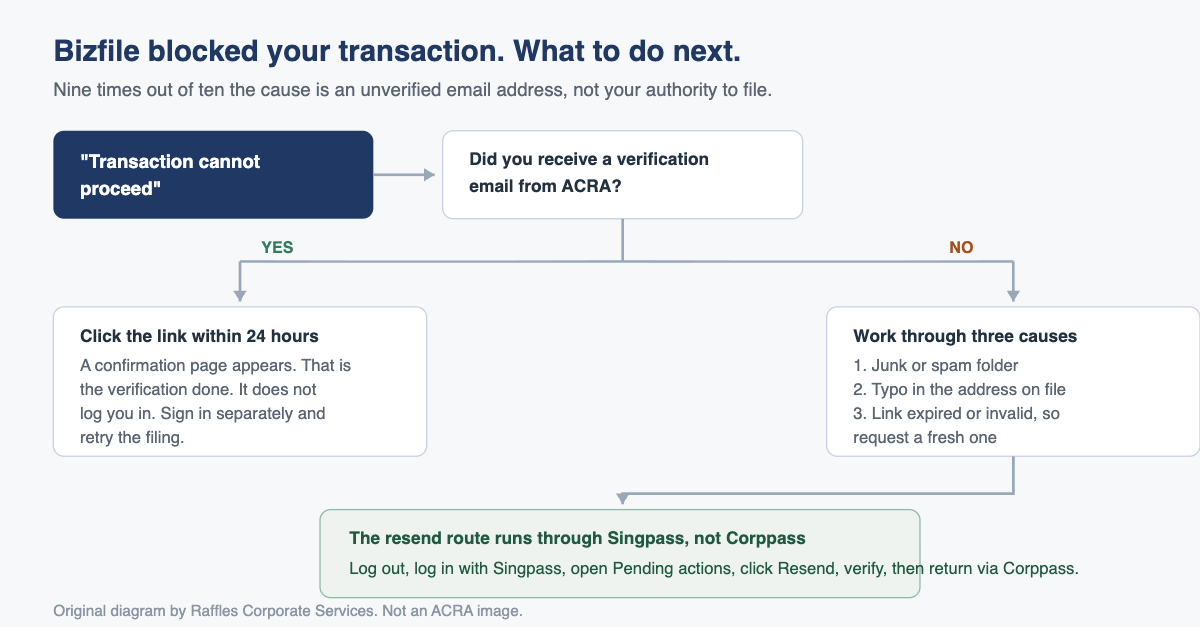
If Bizfile has stopped you with a message saying the transaction cannot proceed, the cause is almost never your entitlement to file. It is an unverified email address. Log in with Singpass, clear the pending verification task, and the block disappears.
That is the two-minute answer. The longer answer is worth reading, because the email address sitting on your Bizfile record does more work than most directors realise. It is the address ACRA uses to reach you about your own company: filing reminders, notices of changes lodged against your entity, and correspondence you would rather not find out about second hand.
An unverified or wrong email is therefore two problems wearing one coat. In the short term it blocks a transaction. In the long term it makes you invisible to the regulator.
What “email verification” actually means on Bizfile
Email verification is a one-off confirmation that the email address recorded against a person on ACRA’s system genuinely belongs to that person and genuinely works. ACRA sends a link to the address on file. You click it. The address is then marked verified, and stays verified until it is changed.
It is deliberately separate from logging in. Verifying your email does not sign you in to Bizfile, and signing in to Bizfile does not verify your email. They are two independent checks, which is precisely why people get stuck: they are already logged in, so they assume the identity question has been settled.
The verification link is short-lived. It expires 24 hours after it is sent. Leave it in an inbox over a long weekend and you will need a fresh one.
When does Bizfile make you verify your email?
Verification is triggered by the transaction, not by the person. Certain filings cause ACRA to push a verification email to the address supplied in that filing.
| What was filed | Who has to verify |
|---|---|
| Registration of a new business entity | Position holders of the new entity |
| Update to position holder information, where an individual email address changed | The position holder whose email changed |
| Update to shareholder information, where a shareholder email address changed | The shareholder whose email changed |
| Appointment of a position holder | The newly appointed position holder |
| Registration as a registered qualified individual | The individual registering |
Two patterns follow from that table.
First, a newly incorporated company will generate verification emails for every position holder at once. If three of the four directors ignore them, three of the four directors will hit a wall the first time they try to transact.
Second, verification is attached to the email address, not to the entity. Change your email and you verify again. Hold positions in six companies with the same address and you verify once. That second point matters if you are a director across a group, and it connects directly to switching profiles on Bizfile, where one identity spans several entities.
How to verify, in order
- Open the verification email from ACRA. Check your junk folder before concluding it never arrived.
- Click the confirmation link inside it, within 24 hours of receipt.
- You will land on a confirmation page telling you the address has been verified. That is the whole verification step.
- Now log in to Bizfile separately, using Singpass or Corppass depending on what you are doing. The confirmation page does not log you in.
- Retry the transaction that was blocked.
That is it. There is no form, no fee and no waiting period.
“Transaction cannot proceed”: the Singpass fix
This is the error most people actually arrive with, and the fix is slightly counterintuitive because it sends you to a different login route from the one you were using.
You were probably logged in as a business user through Corppass, because that is how company filings are done. But the pending verification task lives on your personal dashboard, which you reach through Singpass. So:
- Log out of your current Bizfile session entirely.
- Log back in to Bizfile using Singpass, as an individual user.
- Look at Pending actions on your dashboard. The outstanding email verification item will be sitting there.
- If the original email is long gone or its link has expired, use the Resend option against the email verification item. A fresh link is sent immediately.
- Open the new email, click the link, confirm.
- Log out, then log back in through Corppass and complete the filing you were trying to do.
You do this once per email address. It does not recur.
If you are also trying to pull your registers while this is unresolved, the same block applies, which is why the error turns up so often in the context of downloading your company registers free from Bizfile.
The verification email never arrived. Now what?
Work through these in order, because they are ranked by how often they turn out to be the cause.
1. Junk and spam. Automated government mail is filtered aggressively by corporate mail systems, particularly where the company uses strict anti-spoofing rules. Search your junk folder for mail from ACRA before doing anything else.
2. A typo in the address on file. This is the second most common cause and the most annoying, because nothing in Bizfile tells you it has happened. The mail is being delivered somewhere; it just is not being delivered to you. A single wrong character is enough.
Checking the email address ACRA holds for you
If you are an authorised position holder, you can check and correct it yourself:
- Log in to Bizfile as a business user through Corppass. If Corppass itself is the obstacle, start with our Corppass setup guide for new companies.
- From the mega menu, select Manage, then Update position holder information.
- Confirm the entity details shown are the right entity.
- Click Start.
- Read the email address on the position holder record character by character. Read it out loud if you have to.
- If it is wrong, enter the correct address and an effective date of change. The effective date cannot be in the future.
Correcting the address will itself trigger a fresh verification email to the new address, which closes the loop.
If a corporate service provider handled your incorporation, the address on file may be one they entered on your behalf. In that case ask them to check and update it rather than filing over the top of their record.
3. Request a new link. If the address is correct and the mail genuinely is not arriving, or the link has expired or come back invalid, use the resend route through your Singpass dashboard described above.
What goes wrong in practice, and what it costs
The blocked transaction is the visible failure. It is also the harmless one, because you notice it immediately and fix it in ten minutes.
The expensive failure is the email address that is verified, valid, and pointed at the wrong person.
We see three versions of it repeatedly. The departed employee, whose work address was used to set up the company’s ACRA records years ago and whose mailbox was deactivated when they left, so reminders now bounce into nothing. The shared inbox nobody reads, because info@ or admin@ belongs to everyone and therefore to no one. And the personal address of one director, which is fine until that director travels, changes provider, or falls out with the other shareholders.
The consequence is not theoretical. Directors have personal statutory duties that run on fixed clocks: holding an annual general meeting under section 175 of the Companies Act 1967 unless the company is exempt under section 175A, and filing the annual return under section 197. ACRA’s reminders are a courtesy, not a legal safety net. Missing them is not a defence, default penalties under section 408 sit behind those obligations, and ACRA’s late lodgement penalties apply per late transaction.
Worse, changes filed against your company also generate notifications. If someone lodges an appointment or a change of registered office and the notification goes to a dead mailbox, the first you may hear of it is much later, and by then unwinding it needs rectification by the Registrar on application under section 12C or, in the harder cases, a court application under section 12B.
At the far end of the spectrum, a company that stops responding to ACRA entirely can be struck off the register on the Registrar’s own initiative under section 344. Getting back on the register afterwards is a considerably longer conversation, as our note on company reinstatement and restoring statutory registers sets out.
Which email address should you actually use?
A short set of rules that has served our clients well:
- Use an address tied to a role that will always exist, monitored by a named human who knows what an ACRA notice looks like.
- Avoid an address controlled by a single employee who could resign.
- Avoid an unattended shared alias unless someone genuinely owns it and checks it.
- If your corporate secretary handles compliance, they should be on the distribution, but the company should not rely on them alone. Officers hold the statutory duty personally.
- Whitelist ACRA at your mail gateway so future notices do not get filtered.
- When a director or shareholder changes their email in real life, update ACRA within the same week. It is a small filing that prevents a large problem.
None of this stops you looking things up. Bizfile’s public searches run without a login and without verification, so you can still check an entity’s status or a person’s registration while your own verification is outstanding. Our guide to Bizfile’s search functions covers what those searches return free and what you have to pay for.
Frequently asked questions
Why does Bizfile say my transaction cannot proceed when I am clearly authorised to file?
Because the block is on your email verification status, not your authorisation. Bizfile will not let you transact until the email address recorded against you has been verified. Log in with Singpass, clear the pending verification item on your dashboard, then log back in through Corppass and retry.
How long is the ACRA verification link valid?
The link expires 24 hours after it is sent. If you click an expired link, nothing is lost. Log in to Bizfile with Singpass, find the email verification item under Pending actions, and request a fresh link. There is no limit on how many times you can resend.
Do I have to verify my email again for each company I am a director of?
No. Verification attaches to the email address, not to the entity. Once an address is verified it stays verified across every entity you are associated with, until you change the address. Changing it triggers a fresh verification to the new address.
My corporate service provider registered the company. Can they fix my email?
Yes, and usually they should. If a CSP handled the registration, the email on file may be one they entered. Ask them to check and update it rather than filing a competing update yourself. You remain responsible for the address being correct.
Does verifying my email log me in to Bizfile?
No. The two are deliberately separate. Clicking the verification link confirms the address and shows a confirmation page, nothing more. To transact you still log in separately through Singpass as an individual, or Corppass as a business user.
What happens if I simply ignore the verification?
Transactions requiring verification stay blocked, and you will not reliably receive ACRA notices about your entity. That second consequence is the dangerous one, because it is silent. Statutory deadlines under sections 175 and 197 of the Companies Act 1967 continue to run whether or not you saw the reminder.
Getting the boring things right
Email verification is the smallest possible piece of compliance admin. It is also a useful proxy for something bigger: whether anybody in your company is actually watching the channel ACRA uses to talk to you.
Raffles Corporate Services maintains the statutory records and ACRA correspondence for several hundred Singapore companies. We keep officer and shareholder contact details current, monitor the notices, and act on them before they turn into penalties. If you are not certain the address ACRA holds for your directors still reaches a living person, that is a five-minute check and worth doing today.
You can reach us through Raffles Corporate Services, or read more on Singapore corporate secretarial practice at Singapore Secretary Services.
The Editorial Team, Raffles Corporate Services