
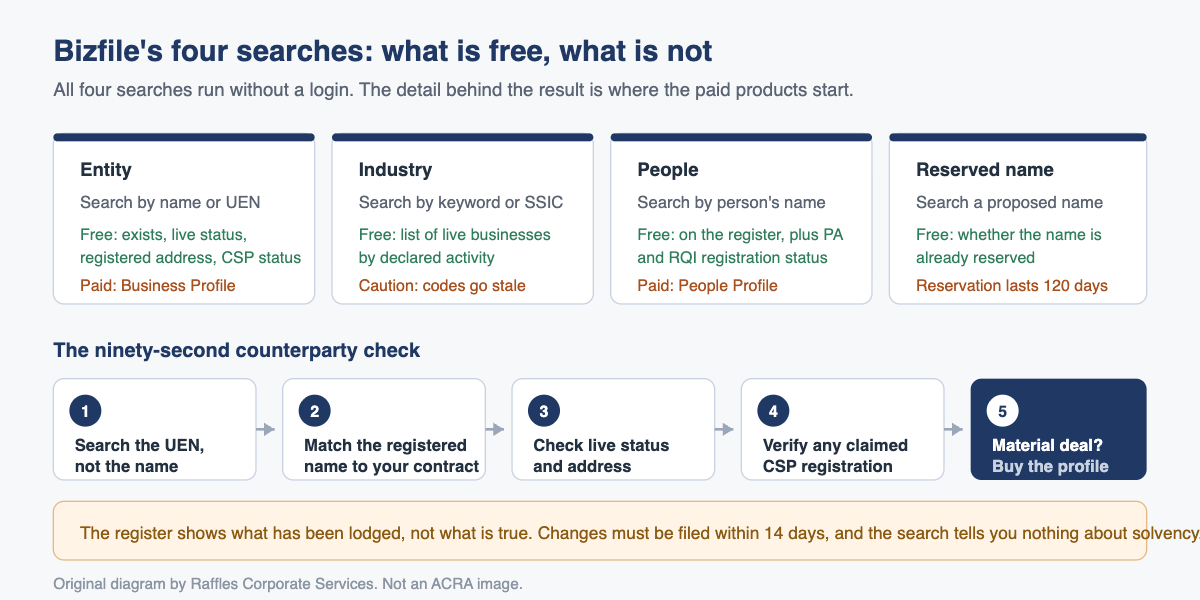
Bizfile has four searches: entity, industry, people and reserved name. All four are free to run, and they will tell you whether a company exists, whether it is live, where it is registered and who is behind it. What they will not give you free is the detail, and that distinction is the whole game.
Raffles Corporate Services works with a panel of experienced Singapore law firms who offer cost-effective and efficient legal service and advice. This article is general information only and is not legal advice.
Most people use Bizfile once, to check whether a company name is taken, then never touch it again. That is a missed opportunity, because the same tool is the cheapest counterparty check available to a Singapore business and it takes about ninety seconds.
Below is what each search does, what you get without paying, and how to use it as a basic due diligence step before you sign a contract, extend credit or take on a new supplier.
The four searches at a glance
You reach all four from the Bizfile home page, without logging in.
| Search | What you search by | What it is genuinely good for |
|---|---|---|
| Entity | Business name or UEN | Confirming a company exists, is live, and matches the name on your contract |
| Industry | Keyword or SSIC code | Finding live businesses by what they actually do |
| People | A person’s name | Seeing whether a named individual is on the register, and in what capacity |
| Reserved name | A proposed business name | Checking whether a name you want is already reserved by someone else |
Entity search: the one you will use most
Select the Entity tab and type either the business name or the UEN.
The single most useful control is the keyword match type filter, and choosing badly is why people conclude a company “is not on Bizfile” when it plainly is:
- Name containing casts the widest net. Use it when you are unsure of the exact registered name, which is most of the time. Trading names and registered names diverge constantly.
- Name starting with narrows things when you are confident about the opening words.
- Name exact match is for when you have the registered name character for character, usually off an invoice or a contract.
If you are searching by UEN, set the match type to UEN (including previous UEN) and apply the filter. That last part matters: entities that have converted structure or been re-registered may carry a superseded number, and a plain UEN search will miss them.
Once you find the entity, click More information to open its profile.
Too many results
Bizfile caps a result set at 250 matches. A message saying there are more than 250 matching results does not mean you have broken anything; you have simply searched too broadly. Narrow it by typing the first character in the search bar to reveal the pre-search filters, then filter by entity type or status. Tightening the match type from “containing” to “starting with” usually does the job on its own.
What the entity search gives you for free
This is the part that surprises people. Without paying anything, and without logging in, the entity search will confirm whether the entity exists on the register, its live status (active, struck off, wound up or otherwise not trading), its registered address, and whether it is a registered corporate service provider, with CSP details shown at the bottom of the profile.
Those four facts answer most of the questions a business actually has about a counterparty at first contact.
The register covers more than companies. Foreign companies, limited liability partnerships, limited partnerships, public accounting firms and variable capital companies are all ACRA-registered and all searchable. It reaches further still: because UENs are issued across government, Bizfile also carries basic records for societies, charities, trade unions, healthcare institutions and more. To find one, start typing in the entity search to reveal the filters, then set the issuance agency filter to the relevant agency. If you have ever concluded that a charity or a clinic “is not registered” because it did not surface in a default search, this is why.
Free versus paid: where the line falls
| What you want to know | Free from the search? | How you get the detail |
|---|---|---|
| Does the entity exist | Yes | Entity search |
| Is it live, struck off or wound up | Yes | Entity search, live status |
| Registered address | Yes | Entity search |
| Is it a registered CSP | Yes | Entity profile, CSP section |
| Full officer and shareholder detail, capital, history | No | Business Profile, a paid product |
| Which entities a named person is or was involved in | No | People Profile, a paid product |
| Your own company’s statutory registers | Yes, if you are an officer or member | Free business products in Bizfile |
We do not quote prices here, because ACRA sets them and they change. Check the current fee on the ACRA page before you buy.
The practical rule: the free search answers “is this real and is it alive”. The paid profile answers “who is behind it and what shape is it in”. For a small transaction the first is often enough. For anything where you are extending credit or committing capital, buy the profile.
Searching needs no login. Buying does, and that is where the usual Bizfile obstacles appear: an unverified email address will stop the transaction, and the fix runs through Singpass rather than Corppass, as our note on verifying your email for Bizfile explains. If you act for several companies, check which entity you are logged in as first, using switch profile.
Industry search: finding businesses by what they do
Select the Industry tab. This search returns live businesses filtered by business activity, which makes it the only one of the four that is genuinely a discovery tool rather than a verification tool.
You can drive it three ways:
- By SSIC category. Type any character in the search bar and Bizfile shows the top ten SSIC categories. Pick one, then select up to five business activities beneath it, and search.
- By SSIC code. Type the five-digit code directly. If you do not know it, ACRA publishes a guide to finding the right SSIC code.
- By description keyword. Type a plain word such as “manufacture” and select up to five matching activities.
The same 250-result cap applies, and narrowing to a single category or adding an entity type filter fixes it.
One caution. SSIC codes describe what a business declared it does, not what it does today. Companies pivot and rarely update their codes. Treat an SSIC match as a starting point, not as a fact about current operations.
People search: checking an individual
Select the People tab and enter the person’s name. If you are unsure of the exact spelling, use the name containing or name starting with filters and expect multiple matches. Singapore names repeat. Click More information on a result to view the profile.
Two specific checks are worth knowing. Is this person a public accountant? You will need their five-digit PA registration number. Enter the name, put the number into the Public Accountant registration no. filter, and search. If the profile status reads “Active”, it will also list their related public accounting entities. Is this person a registered qualified individual? Search the name and open the profile. If the status reads “Registered”, the profile shows the QI registration date and expiry date. The expiry date is the field people forget to look at.
To see the full list of entities a person is or has been involved in, you need the paid People Profile. That is the product to buy when you are checking whether a prospective director or business partner has a trail of struck-off or wound-up companies behind them.
Reserved name search: before you fall in love with a name
Use this alongside the entity search when you are choosing a company name. The entity search tells you whether a name is already registered; the reserved name search tells you whether someone has reserved it and not yet used it.
Select the Reserved name tab, enter the name, and narrow with the entity type or industry filters if you need to. If a name is available and you apply for it, ACRA reserves it for 120 days.
If your proposed name is identical or uncomfortably similar to something already registered or reserved, change it now rather than arguing about it later. Adding a meaningful distinguishing word is usually enough. This matters for anyone weighing a fresh incorporation against the alternatives, a decision we cover in buying a shelf company versus incorporating fresh.
Using Bizfile as a counterparty check
Here is a sequence you can run in under two minutes before signing a contract or granting credit terms. It does not replace proper due diligence on a material transaction, but it catches the obvious problems, and the obvious problems are the ones that bite small businesses.
- Search the UEN, not the name. Take the UEN off the quotation, invoice or draft contract. Set the match type to UEN including previous UEN. If it does not resolve to anything, stop and ask why.
- Check the registered name matches your paperwork. A trading name is not a legal entity. You cannot sue a trading name.
- Check live status. If the status is anything other than live, escalate it before signing.
- Check the registered address. A registered office in a residential unit is not a red flag in itself, but an address that contradicts everything the counterparty has told you about their operation is worth a question.
- If they claim to be a corporate service provider, verify it. CSP information appears at the bottom of the entity profile if they are registered. If it is absent, they are not.
- For anything material, buy the Business Profile. Officers, shareholders, issued capital and filing history are worth the fee when you are about to be exposed.
What the register will not tell you
Be honest about the limits, because over-reliance is its own risk.
The register shows what has been lodged, not what is true. Changes to officers and shareholders must be filed within 14 days, and the register reflects reality only if somebody did that. A company that changed control last month and has not filed will look unchanged.
It tells you nothing about solvency. A live status means the entity has not been struck off or wound up. It does not mean it can pay you. That question belongs to the accounts, and to the sort of analysis in what banks and lenders look for.
Nor does it surface who really owns or runs the company. Registers of nominee directors and nominee shareholders, and the register of registrable controllers, are maintained separately and are not part of a public search, as our piece on nominee shareholder arrangements explains. And someone never appointed to the board can still attract director-level liability, which we cover in shadow directors in Singapore.
What goes wrong in practice
The most common and most expensive error is contracting with the wrong legal entity.
Group structures in Singapore routinely feature several companies with near-identical names, differing by one word or by the suffix. A supplier deals with the operating company for years, then signs the renewal with the dormant holding company because that is the name someone typed on the draft. When the debt goes bad, the entity on the contract has no assets and the entity with the assets is not a party to anything. The fix costs nothing: search the UEN, and record the UEN in the contract itself.
The second error is treating a stale search as current. A Bizfile search is a snapshot at the moment you ran it. If you searched a counterparty in January and are signing in September, search again. Statuses change, and an entity struck off under section 344 of the Companies Act 1967 does not send you a notice.
The third is assuming the officer list on a paid Business Profile is complete as to control. It reflects what has been lodged under section 173 of the Companies Act 1967 for officers and section 196A for members of a private company. Both are authoritative as registers, and both depend on somebody having filed.
Frequently asked questions
Is searching Bizfile free?
Running any of the four searches is free and does not require a login. You will see whether an entity exists, its live status, its registered address, and its CSP registration details if it has any. Detailed products such as a Business Profile or a People Profile are paid, and ACRA sets those fees.
How do I search by UEN on Bizfile?
Select the Entity tab, enter the UEN, then set the keyword match type filter to “UEN (including previous UEN)” and apply filters. The “including previous UEN” option matters, because entities that changed structure may carry a superseded number that a plain search will not match.
Why does Bizfile say there are more than 250 matching results?
Because your search is too broad. Bizfile caps a result set at 250. Type the first character in the search bar to reveal the pre-search filters, then narrow by entity type or status, or tighten the keyword match type from “name containing” to “name starting with”.
Can I find out which companies a person is a director of?
Not from the free search. The free People search confirms whether an individual appears on the register and shows public accountant or registered qualified individual status. To see the entities a person is or was involved in, you need to buy a People Profile from Bizfile.
How long can I reserve a company name for?
If your proposed name is available and your application is approved, ACRA reserves it for 120 days. Use the reserved name search together with the entity search before applying, so you can see both registered names and names someone else has already reserved but not yet used.
Is a Bizfile search enough due diligence before extending credit?
No, but it is the right first step. It confirms the entity is real, live and correctly named, which prevents the most common contracting errors. It says nothing about solvency, beneficial ownership or unfiled changes. For material exposure, buy the Business Profile and look at the financial statements too.
Knowing who you are actually dealing with
Two minutes on Bizfile before you sign is one of the highest-return habits a Singapore business can build. It is free, it is public, and it catches the errors that later become recovery actions.
Where it stops being simple is when a search raises a question rather than answering one: a status that has changed, a shareholder who does not look like the real owner, a group structure where nobody can tell you which company you are supposed to be contracting with. Raffles Corporate Services handles that end of it. If a search has thrown up something you do not like the look of, it is worth a conversation before the signature rather than after.
You can reach us through Raffles Corporate Services, or read more on Singapore corporate secretarial practice at Singapore Secretary Services.
The Editorial Team, Raffles Corporate Services
Need help with this?
Raffles Corporate Services can handle the ACRA filings, compliance documentation and records for you, and where court proceedings or legal advice are needed, we work with a panel of experienced Singapore law firms who offer cost-effective and efficient legal service and advice.
Email: [email protected]
Call, SMS or WhatsApp: +65 8501 7133