
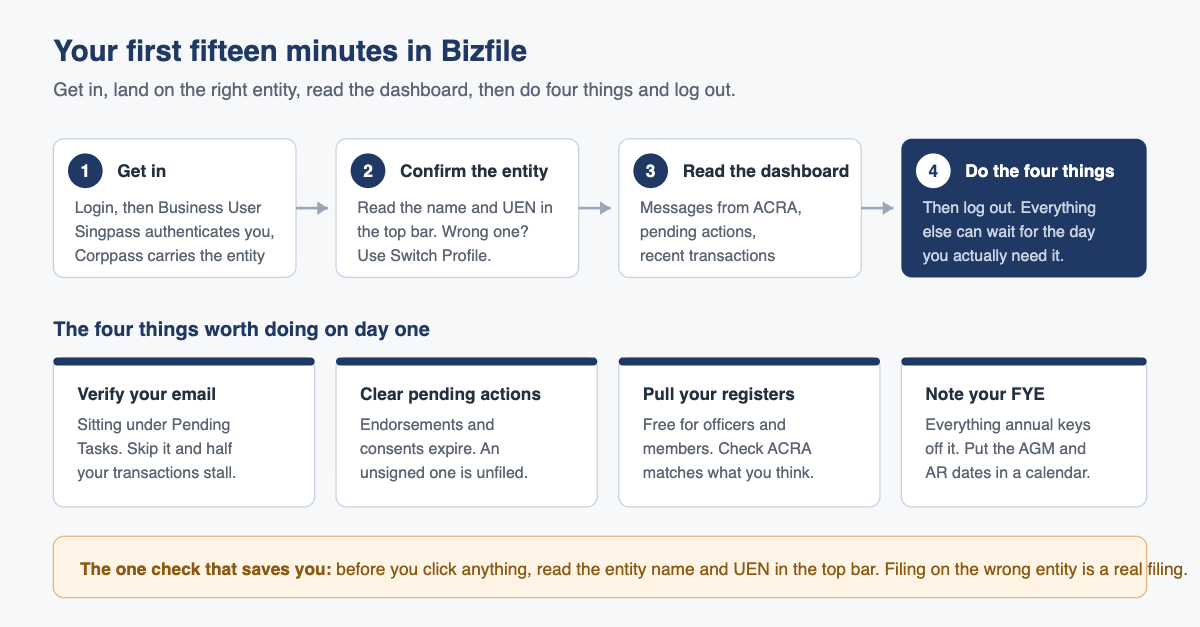
Log in as a Business User, confirm the entity name in the top bar is the right company, then read three things on the dashboard: messages from ACRA, pending actions, and recent transactions. That is the whole orientation. Everything else can wait.
Most first sessions in Bizfile go badly for a boring reason. People log in with a task in mind, cannot find the eService, start clicking through the mega menu, and lose twenty minutes without ever noticing the three panels that would have told them what the company actually owes.
So do it the other way round. Spend the first fifteen minutes reading rather than transacting. Here is what to look at, in order, and the four things worth doing before you log out.
Getting in
There are two doors into Bizfile and they lead to different places.
Individual User takes you in as yourself. You authenticate with Singpass and you act in your personal capacity. This is the route for personal items: verifying your own email address, checking alerts addressed to you, and transacting for a sole proprietorship registered in your own name.
Business User takes you in as a representative of an entity. You still authenticate through Singpass, so the first screen looks identical, but after Singpass verifies you the session is handed to Corppass, which decides which entities you are allowed to act for. Everything a company files runs through this door.
If you are a director or company secretary of a private limited company, you want Business User. If Bizfile will not let you through that door, the problem is nearly always on the Corppass side rather than the Bizfile side, and our guide to logging in to Bizfile as a business user works through every common cause.
Landing on the right entity
Depending on how your Corppass access is set up, one of two things happens next.
If your Corppass account is tied to a single entity, Bizfile drops you straight onto that entity’s dashboard. If you hold positions in several entities, Corppass presents a list and asks you to choose, and you may then see a short confirmation step before the dashboard loads. Either way, you end up looking at one entity’s dashboard, not a portfolio view.
Read the entity name and the unique entity number in the top bar before you do anything else. This is the single most valuable habit in the whole system. Bizfile does not warn you that you are about to file against the wrong company, because from its point of view you are not doing anything wrong: you hold a position there, you are authorised, the transaction is valid. A misdirected filing is a real filing, and undoing it takes a second transaction and a second fee.
To move between entities, use Switch Profile. If the entity you want is not in the list, your Corppass administrator has not granted you access to it, and no amount of clicking inside Bizfile will produce it.
Reading the dashboard
The dashboard is organised around three questions, and each panel answers one of them.
| Panel | The question it answers | What to do with it |
|---|---|---|
| Messages from ACRA | Has the regulator said anything to us? | Read everything unread. Reminders, queries on a submitted filing and notices of non-compliance all arrive here |
| Pending actions | Is something waiting on a human? | Clear these first. An endorsement or consent that nobody signs is a filing that never completes |
| Recent transactions | What has actually been filed, and did it go through? | Use it to confirm that a filing you were told about genuinely landed, and to see its status |
The recent transactions panel is the one directors underuse. If your corporate secretary tells you a change was filed last Tuesday, this is where you confirm it without having to ask twice. It is also where you find out that a transaction is sitting in a draft or pending state rather than completed, which is a very different thing from filed.
Finding a transaction in the navigation menu
Above the panels sits the navigation menu, which is where transactions actually start. It is organised by task rather than by form number, so you look for what you are trying to achieve rather than for a form code. The menu is also the honest measure of what you can do: an eService that does not apply to your entity type will not be available to you, which is why a sole proprietor will not find share allotment.
The four things worth doing on day one
Everything below takes minutes and pays for itself the first time it saves a filing.
- Verify your email address. This one is not optional in practice. An unverified email address will stop transactions later, usually with an unhelpful message that says nothing about email. The verification link sits under Pending Tasks, and the counterintuitive part is that you verify it through the Singpass route even if you normally log in as a Business User. Log out, log back in with Singpass, open the verification task, verify, then log back in with Corppass. You do it once per address.
- Clear every pending action. Endorsements and consents have expiry windows. A director’s consent to act that nobody endorses does not sit there patiently. It lapses, and the filing behind it has to be restarted.
- Download your registers. As a current officer or member you can pull your company’s registers at no cost and with no limit. Do it on day one and read them properly. This is the moment you find out whether ACRA’s record of your directors and shareholders matches what you believe to be true. Our guide to downloading your company registers free from Bizfile has the exact path.
- Write down your financial year end. Almost every annual obligation keys off it. Under Section 175 of the Companies Act 1967 a company must hold its annual general meeting within the statutory window after financial year end unless it is exempt or has dispensed with the meeting, and under Section 197 a private company must lodge its annual return within 7 months after financial year end. Put both dates in whatever calendar you actually look at. If your financial year end is wrong or needs changing, that is a filing in its own right, covered in our note on changing your company’s financial year end.
What goes wrong in the first session
People start a transaction to find out what it involves. Bizfile transactions are multi-step and some of them create a record from the moment you begin. Opening a filing to have a look around is a habit worth breaking. If you want to know what a transaction needs, read the guidance first or ask your corporate secretary.
People do not notice the entity switch. This is worth repeating because it is the most expensive fifteen-minute mistake available. Two companies, similar names, one session, one filing against the wrong unique entity number. It happens most often to directors of a holding company and its subsidiary.
People clear the notification without reading it. A message from ACRA about a query on a submitted document is not the same as a marketing reminder. Queries have response windows. An unread query becomes a rejected filing becomes a late filing becomes a penalty, and none of those steps requires anyone to have done anything wrong beyond not reading.
People assume the dashboard is a compliance calendar. It is not. It shows what ACRA has raised and what is pending inside Bizfile. It does not know about your tax deadlines, your GST returns, your work pass renewals or the AGM you have not scheduled. Directors who treat an empty dashboard as evidence of a clean bill of health are reading it wrong.
Frequently asked questions
I logged in and the dashboard is empty. Is something broken?
Probably not. A quiet company with nothing pending and no recent filings will show very little. Confirm you are on the right entity using the name and unique entity number in the top bar, then download your register of directors to check the system does hold your company’s data.
Why can I see one of my companies but not the other?
Because Corppass grants access entity by entity. Bizfile only shows what Corppass has authorised you for. Ask the Corppass administrator of the missing entity to assign you the relevant access rights. This is not something ACRA can fix for you.
Do I have to use Corppass, or can I just log in with Singpass?
For anything a company files, you need the Business User route, which runs through Corppass. Singpass on its own gets you in as an individual. The exception worth knowing is email verification, which is done through the Singpass route even for business users.
How do I know a filing actually went through?
Check the recent transactions panel on the dashboard and look at the status, not just the presence of an entry. A transaction in draft or pending state has not been lodged. For anything that changes the register, the definitive check is to download the register itself a few days later and read it.
Should the director have access, or is the corporate secretary enough?
Both. The secretary does the filing, but a director with read access can verify that filings landed, see ACRA’s messages first hand, and catch a problem while it is still cheap. It costs nothing to have.
Fifteen minutes now, or an afternoon later
The point of the first session is not to learn Bizfile. It is to find out whether your company’s public record says what you think it says, and whether anything is quietly waiting for a signature.
If you have not read part 1 of this guide, what Bizfile actually is and what you can and cannot do in it explains where Bizfile stops and IRAS, MOM and the licensing portals begin. For the wider statutory picture, our Companies Act 1967 deep-dive FAQ covers the obligations sitting behind the filings.
Raffles Corporate Services handles the Bizfile side for several hundred Singapore companies: the filings, the deadlines, and the reconciliation between what ACRA holds and what your own records say. If your first fifteen minutes turned up something that does not look right, we would rather you asked now than at year end.
You can reach us through Raffles Corporate Services, or read more on Singapore corporate secretarial practice at Singapore Secretary Services.
— The Editorial Team, Raffles Corporate Services