

To file anything on behalf of a company, choose Business User at the Bizfile login, not Individual User. You will still authenticate with Singpass, but the session is then handed to Corppass, which decides which entities you may act for. That handover is where almost every login problem lives.
Raffles Corporate Services works with a panel of experienced Singapore law firms who offer cost-effective and efficient legal service and advice. This article is general information only and is not legal advice.
The distinction confuses people because both routes start with the same Singpass screen. You scan the same QR code or key the same password. It feels like one login. It is not.
Understanding what each door actually gives you turns a frustrating twenty minutes into a two-minute diagnosis, because the symptom tells you which system is refusing you.
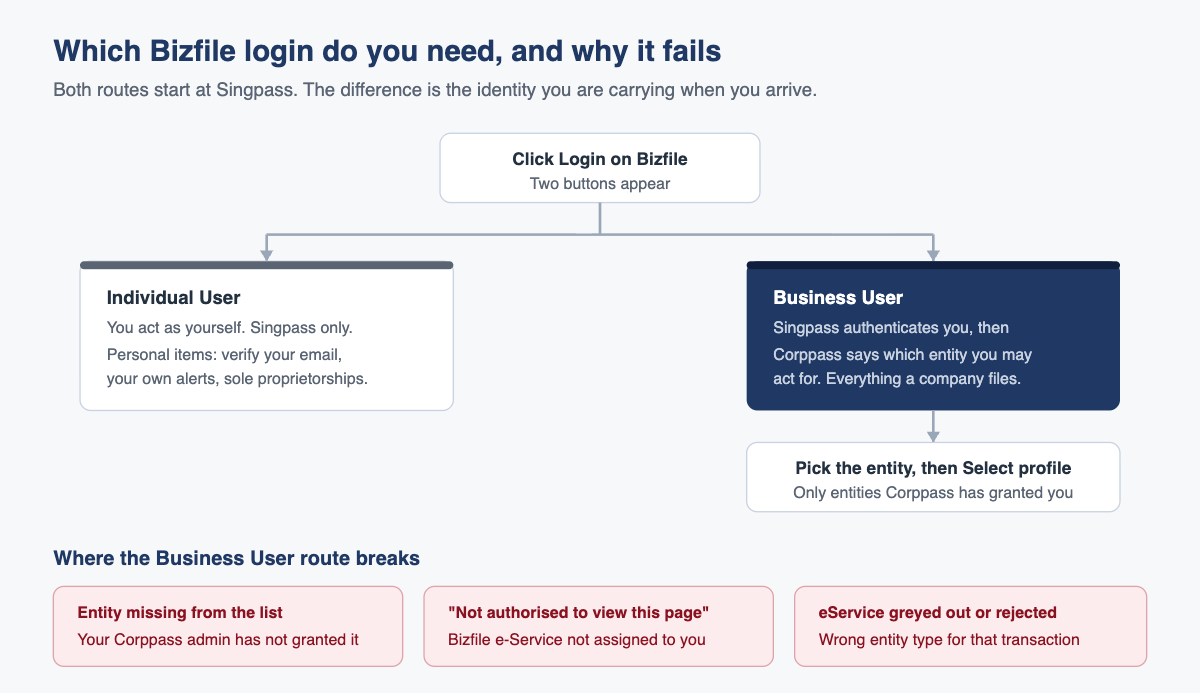
Singpass or Corppass: what is actually different
Singpass proves who you are. Corppass proves what you are allowed to do on behalf of an entity. Bizfile needs both facts before it will let you file for a company, and it collects them in that order.
The practical consequence is that authentication and authorisation fail differently, and they fail at different points in the journey.
| Individual User | Business User | |
|---|---|---|
| What it establishes | Your personal identity | Your identity, then your authority to act for an entity |
| Systems involved | Singpass | Singpass, then Corppass |
| You act as | Yourself | The entity you select |
| Typical use | Verifying your email, reading your own alerts, sole proprietorship matters | Every filing a company, LLP or partnership makes |
| Who controls your access | You | Your entity’s Corppass administrator |
| If it fails | Usually a Singpass problem | Usually a Corppass authorisation problem, not a Bizfile problem |
That last row is the whole article in one line. If you reached a Singpass screen and got past it, Singpass is fine and your problem is downstream.
Who should be using the Business User route?
You need Corppass rather than plain Singpass if you are filing on behalf of an entity with a registered unique entity number. In practice that means:
- Directors, company secretaries and other position holders filing for their own entity
- Employees authorised to transact for the entity, including within a group of companies
- Corporate service providers filing for clients
- Insolvency practitioners acting in a formal appointment
If you are transacting only for yourself, for instance a sole proprietor registered in your own name, the Individual User route is the right one and Corppass is unnecessary overhead.
What you can do once you are in
The Corppass route unlocks the filing catalogue rather than just the reading room. Broadly:
- Registration and renewal: reserving an entity name, registering a new entity, renewing a business registration
- Annual obligations: filing annual returns and declarations, and general lodgements
- Register maintenance: accessing the company registers, updating entity or position holder particulars, appointing and withdrawing position holders, and endorsing those appointments where a corporate owner is involved
- Shares: updating share information and shareholder information
- Charges: registering a new charge
- Closure: cessation, dissolution, winding up and striking off applications
Before you attempt the login
Two things must exist, and neither of them is created inside Bizfile.
- An active Corppass account in your own name. Corppass accounts are personal. They are issued to individuals, not to companies, and they are administered at corppass.gov.sg. If your company has just been incorporated, someone has to become the Corppass administrator before anyone can be assigned anything.
- Corppass access to ACRA’s eServices, assigned to you. Having a Corppass account is not the same as being allowed to use Bizfile. Your administrator has to assign the relevant ACRA digital services to your account. This is the step that is missed most often.
Our guide to setting up Corppass for a new Singapore company covers the administrator appointment, and our Corppass setup and management guide covers assigning users and third parties once the account exists.
The steps, in order
- Open the Bizfile homepage and select Login.
- Choose Business User. This is the Corppass route.
- On the Singpass screen, scan the QR code with the Singpass app or enter your Singpass credentials. Singpass verifies you, then hands the session to Corppass.
- If your Corppass account is linked to more than one entity, Corppass shows a list. Select the entity you want to transact for.
- If a profile confirmation appears, confirm it.
- You land on that entity’s Bizfile dashboard. Check the entity name and unique entity number in the top bar before doing anything else.
- Start your transaction from the navigation menu, which is organised by task rather than by form number.
To change entity mid-session, use Switch Profile rather than logging out and back in.
Corporate service providers have one extra step: after selecting the firm, the profile page requires you to identify yourself as a corporate service provider and pick the firm from the list before the client filing options behave properly.
Every common reason the login fails
Match the symptom to the row. The fix is almost never inside Bizfile.
| What you see | What it actually means | Who fixes it |
|---|---|---|
| You cannot get past Singpass at all | Singpass account issue: locked, expired, app not registered on this device | You, through Singpass |
| Singpass works, but no entities appear | Corppass has not granted you access to any entity | Your entity’s Corppass administrator |
| Only some of your entities appear | Access was granted for one entity but not the others. Corppass is per-entity | The administrator of each missing entity |
| “You are not authorised to view this page” | Your Corppass account is not assigned ACRA’s Bizfile eService, or your Bizfile authorisation is incomplete | Your Corppass administrator |
| The eService you want is missing or refuses you | The transaction does not apply to your entity type. A sole proprietorship cannot file a share allotment | Nobody. It is not available to that entity |
| A transaction stalls with an unhelpful error | Your email address has not been verified | You, through the Singpass route |
| Corporate service provider cannot switch to a client | The client is not on the firm’s maintained client list | The corporate service provider firm |
| Nobody in the company can administer Corppass | The former administrator has left and no replacement was appointed | Corppass, through its administrator recovery process |
Checking what you are actually authorised for
If you suspect the assignment is the problem, you can confirm it yourself rather than guessing. Log in to the Corppass portal with Singpass, open your own profile and look at your assigned eServices. Two sections matter.
The customised list shows the specific services you have been given. Separately, there may be a setting that grants access to every service the entity is onboarded to. If that broader setting is not switched on, you have only what is in the customised list, and if ACRA’s services are not in it you will be refused at Bizfile no matter how senior you are in the company.
ACRA operates several digital services rather than one. Depending on what you need to do, your account may need to be assigned Bizfile itself, the separate service for variable capital companies, the XBRL filing tools, the training portal or the API marketplace. Being assigned one does not give you the others.
What goes wrong in practice
The director assumes seniority equals access. Corppass does not read your title. A sole director with full legal authority over the company will still be refused if nobody assigned the eService to their Corppass account. Authority under the Companies Act 1967 and authorisation in Corppass are different things, and only the second one is what the login checks.
The Corppass administrator leaves. This is the expensive one. The person who set up Corppass at incorporation resigns, nobody thinks about it, and eighteen months later the company cannot file its annual return because there is no administrator to assign anyone. Recovering an orphaned administrator account takes time you do not have when a deadline is running, and late lodgement penalties accrue per late transaction while you sort it out. Appoint at least two administrators, and treat the departure of one as a task, not an afterthought.
The email verification trap. You log in perfectly well, navigate perfectly well, and then a transaction refuses to proceed for reasons that have nothing on the face of it to do with email. The cause is an unverified email address. The fix is genuinely counterintuitive: log out, log back in through Singpass rather than Corppass, open the verification task, verify the address, then log back in as a Business User. Once done, it does not recur.
Filing on the wrong entity. Not a login failure, but a login-adjacent one. If your Corppass account carries several entities and you skip past the selection screen, you can complete a valid filing against the wrong company. Read the top bar. Our walkthrough on your first fifteen minutes in Bizfile covers the habit in more detail.
Frequently asked questions
Why do I see a Singpass screen when I chose Business User?
Because Singpass is the authentication layer for both routes. It confirms who you are. Corppass then takes over and confirms which entities you may act for. Seeing Singpass on the business route is normal and does not mean you clicked the wrong button.
Can ACRA give me access to my own company?
No. Corppass is not administered by ACRA. Access rights are granted by your entity’s own Corppass administrator, and ACRA cannot override that. If you have no administrator, that has to be resolved through Corppass before Bizfile becomes usable.
I am a director but I get “you are not authorised to view this page”. Why?
Because directorship is a legal position, not a system permission. Your Corppass account needs the relevant ACRA eServices assigned to it. Ask your Corppass administrator to assign them, then log out fully and log back in so the new rights take effect.
Do I need a separate login for each company I direct?
No. One Corppass account can carry several entities. You select the entity after logging in, and move between them using Switch Profile. Each entity’s access has to be granted separately by that entity’s own administrator.
What is the difference between the CSP route and the ordinary business user route?
A corporate service provider files for clients rather than for itself, so after logging in it identifies itself as a corporate service provider and selects its firm before choosing a client. The client must already be on the firm’s maintained client list, otherwise it will not appear.
The short version
If you can reach a Singpass screen, Singpass is not your problem. If you get past Singpass and the entity is not there, that is Corppass. If you get onto the dashboard and a transaction refuses you, that is either an unverified email or an eService that does not apply to your entity type. Three symptoms, three owners, and only one of them is ACRA.
For the wider orientation, read what Bizfile actually is and what you can and cannot do in it, and for what to do once you are in, your first fifteen minutes in Bizfile. If you are a corporate service provider rather than a business owner, our Corporate Service Providers Act 2024 compliance FAQ sets out the obligations that sit on top of the filing mechanics.
Raffles Corporate Services sets up Corppass properly at incorporation, keeps a second administrator in place so a single resignation cannot lock a company out, and files on behalf of several hundred Singapore companies. If your company currently has one administrator and no succession plan for that role, that is worth fixing before the next deadline rather than during it.
You can reach us through Raffles Corporate Services, or read more on Singapore corporate secretarial practice at Singapore Secretary Services.
— The Editorial Team, Raffles Corporate Services
Need help with corporate secretarial or compliance matters?
If you would like help with your company's corporate secretarial, governance or compliance requirements, email [email protected] or WhatsApp +65 8501 7133.
Our team can assist with corporate secretarial, accounting and tax matters. Where legal advice is needed, advisers from our associated law firms can assist.