
Your new company cannot file anything with ACRA until somebody holds Corppass access for it. The sequence is fixed: get the UEN, apply for a Corppass administrator account, have a director approve it, select the ACRA e-Services, then log in to Bizfile as a business user.
That takes a few days of elapsed time and about twenty minutes of actual work. What it does not take is any involvement from ACRA, because Corppass is not ACRA’s system. It belongs to GovTech and serves every government agency. ACRA is simply one of the services sitting behind it.
That single fact explains most of the frustration new companies experience here. When you cannot get into Bizfile, your instinct is to contact ACRA. ACRA can tell you what access you need. It cannot grant it.
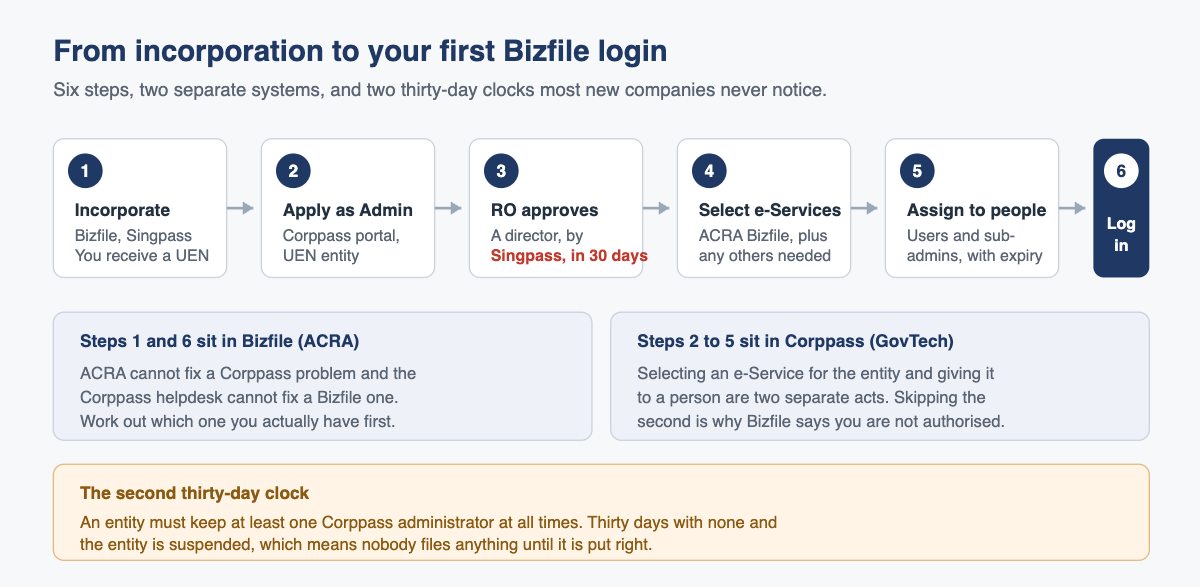
Here is the whole sequence, in order, with the two deadlines that quietly run in the background.
What Corppass actually is
Corppass is the corporate digital identity system for Singapore entities, and it reaches well beyond ACRA into every government service your company will ever use. Since 1 September 2018 it has been the single login method for government-to-business transactions, which is a polite way of saying there is no alternative.
The model is worth understanding because it governs everything that follows. Corppass does not authenticate you. Singpass does that. Corppass answers the next question: given that you are who you say you are, which entities may you act for, and which government services may you use on their behalf?
A Corppass login is therefore two things stacked. Your personal identity, then a permission granted to that identity by somebody at the company. If either half is missing you are stopped, and the error message rarely tells you which half failed.
The three people in the story
Most of the confusion in a new company comes from conflating three roles that Corppass keeps carefully separate.
| Role | Who it is | What they can do | Do they need a Corppass account? |
|---|---|---|---|
| Registered Officer (RO) | A key appointment holder recorded with ACRA, typically a director | Approve or reject Corppass administrator applications, remove a departed administrator | No. A Singpass account is enough to perform the RO functions |
| Corppass Administrator | Whoever the company nominates and an RO approves | Create and manage accounts, select e-Services for the entity, assign them to people, authorise third parties | Yes, that is the account |
| Corppass User | Staff, the finance manager, a director who only needs to file | Use the e-Services assigned to them, nothing more | Yes |
Two consequences follow from that table and both catch people out.
The RO is not automatically the administrator. A director who approves the administrator application has not thereby given herself access to anything. If she wants to file in Bizfile she needs her own Corppass account, of whatever type, on top of the RO function she holds by virtue of being a director.
For a Singapore-registered entity, the administrator must hold an NRIC or FIN. A company whose only director is a foreigner living overseas without a FIN cannot appoint that person as its Corppass administrator. In practice the role goes to a local director, a local employee, or the corporate secretary. Foreign entity structures follow a different path, so take advice before you start rather than after a rejection.
The sequence, in order
You cannot start until incorporation is complete, because Corppass attaches to a Unique Entity Number and until the company exists there is nothing to attach to. Registration itself is done through the individual user route on Bizfile, which we cover in logging in to Bizfile as an individual.
- Confirm you have the UEN. It appears on the ACRA registration confirmation. Nothing below works without it.
- Decide who the administrator will be. Spend two minutes on this rather than defaulting to whoever is nearest a laptop. The administrator controls every government service access the company will ever grant, and replacing one later is more work than choosing well now.
- Apply for the administrator account at the Corppass portal, under Services, Register for Corppass, UEN Registered Entity. The applicant logs in with their own Singpass and follows the on-screen application.
- Nominate the Registered Officer who will approve it. The application asks you to select one. If the company has several directors, any of them can approve. Tell the person you have named, because nobody is watching a portal they have never logged into.
- The RO approves. They go to the Corppass portal, Services, Manage Admin, and log in with Singpass. They have 30 days. Miss that window and the application is auto-rejected and the whole thing starts again.
- Select the ACRA e-Services for the entity. This is the step everybody forgets. Having an administrator account is not the same as the entity having ACRA access. The administrator must add the relevant ACRA e-Services to the entity’s list.
- Assign those e-Services to the people who need them, including to the administrator if the administrator will be filing. Selecting a service for the entity and assigning it to a person are two separate actions.
- Log in to Bizfile as a business user and confirm it works before you need it to.
Steps 1 and 8 happen in ACRA’s world. Steps 3 through 7 happen in GovTech’s. Knowing which system you are in when something breaks saves an afternoon.
The ACRA e-Services to select
There is no single “ACRA” switch. ACRA has several e-Services onboarded to Corppass, and a company with the wrong one selected will get in but be unable to do the thing it came for. The ones to check, and to select where they apply to you, are:
- ACRA Bizfile. The main one. Annual returns, officer changes, share transactions, lodgements.
- ACRA VCC Companies. Only relevant if you have a variable capital company.
- ACRA BizFinx. For XBRL financial statement filing.
- ACRA-ETMS-CP and ACRA API Marketplace. Specialist, and most SMEs will never need them.
Selecting a service the company does not need is not harmful in itself, but it widens what an administrator can hand out later, which is the theme of part 2 on assigning Bizfile e-Service roles.
To confirm what you hold, log in to the Corppass portal and open My Account, then View My Profile and Assigned e-Services. Customised e-Service Access lists the specific services granted to you. Default All e-Service Access is a checkbox that, when ticked, gives that account everything the entity has onboarded. It is convenient and it is the setting to think hardest about.
The two thirty-day clocks
New companies get caught by both, usually a year apart.
Clock one: RO approval. From the moment the administrator application is submitted, the Registered Officer has 30 days to approve it. Nobody chases them. If it lapses the application is rejected automatically and the applicant starts over. In a company where the director travels or where the nominated RO does not know they were nominated, 30 days goes quickly.
Clock two: no administrator at all. An entity must have at least one Corppass administrator at all times. If it has none for 30 days, the entity is suspended. A suspended entity cannot transact with any government agency through Corppass, which means no ACRA filings, and the annual return under Section 197 of the Companies Act 1967 does not pause while you sort it out. Late filing attracts late lodgement penalties that apply per transaction.
The second clock is the more dangerous one because it starts silently. The administrator resigns, terminates her own account on the way out because she is conscientious, and nobody notices for six weeks.
What goes wrong in practice
“You are not authorised to view this page.” The signature error, and it almost never means what people think. It does not mean you lack authority as a director. It means one of three things: your Corppass account is not authorised for the relevant ACRA e-Service, your Bizfile authorisation was never completed, or you are attempting a transaction that does not exist for your entity type. A sole proprietorship cannot file a share allotment, because it has no shares.
The administrator account exists but nothing was assigned. Step 6 and step 7 look like the same step and are not. The company shows an active administrator, everyone assumes access is done, and the first person to try filing an annual return finds the door shut.
Nobody can remember who the administrator is. Common where a temporary staff member handled setup. The Corppass portal has a Find Your Corppass Admin function for exactly this. Try it before rebuilding from scratch.
The company relies on one person. A single administrator is one resignation away from clock two. Appointing a second, or at least a sub-administrator, costs nothing.
Access works but the email was never verified. Even with perfect Corppass access, Bizfile will stop a transaction where a position holder’s email remains unverified. That fix runs through the Singpass individual login, not Corppass, and is set out in our individual user guide.
Once access works, the first useful thing to do with it is pull the company’s own records, which are free to download from Bizfile for officers and members.
Frequently asked questions
Can I apply for Corppass before my company is incorporated?
No. Corppass access is tied to a Unique Entity Number, and you do not have one until ACRA has registered the entity. Incorporate first, using the individual user route on Bizfile with Singpass, then apply for the Corppass administrator account once the UEN is issued.
Who can approve the Corppass administrator application for a private company?
Any Registered Officer of the entity, which for a Singapore private company typically means a director recorded with ACRA. The RO approves through the Corppass portal under Services, then Manage Admin, using Singpass. They do not need a Corppass account of their own to do it.
How long does the RO have to approve the application?
Thirty days from submission. If the application is not approved within that window it is automatically rejected and must be submitted again. Tell your nominated Registered Officer that the application is waiting, because Corppass will not chase them on your behalf.
Our only director is a foreigner with no NRIC or FIN. What do we do?
For a Singapore-registered entity, the Corppass administrator must be an NRIC or FIN holder, so that director cannot fill the role. The usual answers are a local director, a local employee, or your corporate secretary acting under a third-party authorisation. Decide this before incorporation, not after.
Does my corporate secretary need to be our Corppass administrator?
No, and often they should not be. A corporate service provider can act for you through a third-party authorisation, which leaves your own administrator in control of the account structure. That arrangement, and its limits, is covered in part 2 of this guide.
What happens if our only Corppass administrator leaves?
Appoint a replacement quickly. An entity with no administrator for 30 days is suspended and can no longer transact with government agencies through Corppass. If the departed administrator never terminated their account, a Registered Officer can appoint a new administrator or remove the old one directly using Singpass.
Getting the sequence right the first time
This trips up so many new companies because it sits in the gap between two providers. Your incorporation agent hands over a UEN. Corppass is somebody else’s system. Each party assumes the other has it in hand, and three weeks later nobody can file.
Raffles Corporate Services closes that gap as part of incorporation: administrator nominated, RO briefed before the clock starts, ACRA e-Services selected, access assigned and tested with a real login before we call the job done. If you are stuck at an error message, we can usually tell you within minutes which half of the chain is broken.
Part 2 covers who in your company should hold which Bizfile access, and there is further reading at Singapore Secretary Services.
— The Editorial Team, Raffles Corporate Services