

Grant Bizfile access to the smallest number of people who genuinely need to file, give each of them the narrowest role that does the job, and put an expiry date on every assignment. Two administrators, a short list of users, and nobody holding blanket access they never use.
Raffles Corporate Services works with a panel of experienced Singapore law firms who offer cost-effective and efficient legal service and advice. This article is general information only and is not legal advice.
That is the whole recommendation. The rest of this article is about why it matters, because Corppass access does not feel risky. Nobody locks down Bizfile the way they lock down the bank account.
They should. A person with the right Corppass access can change your directors, transfer your shares, alter your registered office and strike the company off. Under Section 196A of the Companies Act 1967 the Registrar’s electronic register of members is the legal register for a private company, so what is filed is what is true until somebody unwinds it.
This is part 2. Part 1, setting up Corppass for a new company, covers getting access in the first place.
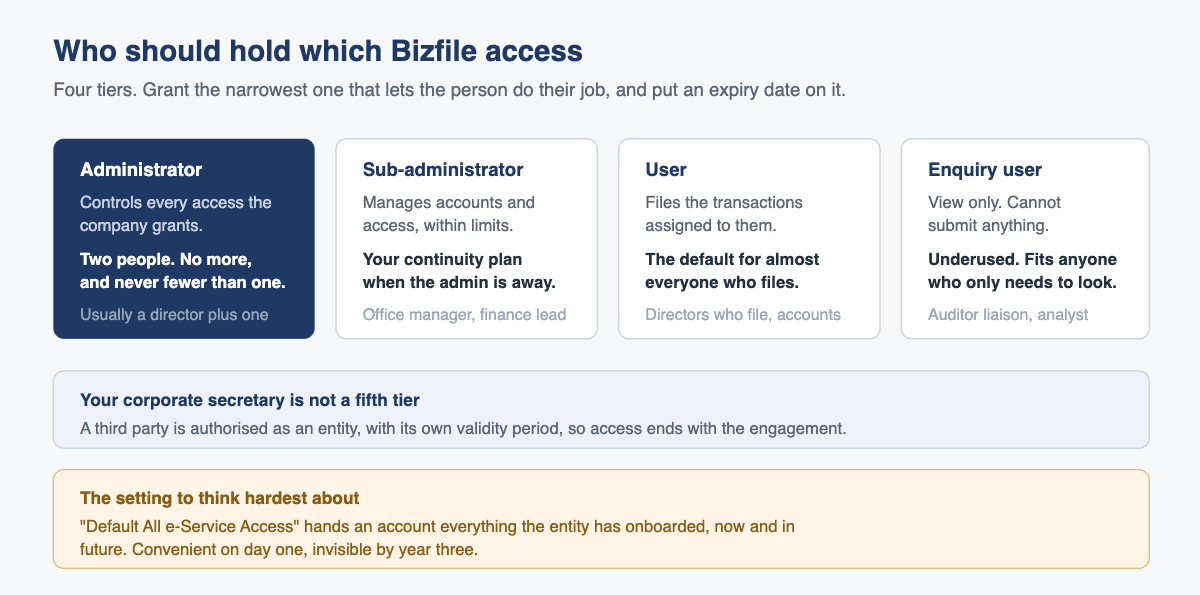
What you are actually granting
An assignment in Corppass has three parts, and people think about only the first: who (a named account tied to one person’s Singpass), what (a specific e-Service, usually ACRA Bizfile, though a company may also hold ACRA BizFinx for XBRL filing), and for how long.
That third part is the one to take seriously. Every assignment carries an effective date and an expiry date, and people ignore the second. Leave it open-ended and access outlives the reason it was granted, which is how a company ends up with a former finance manager who can still file.
A sensible access map for an SME
Corppass offers four account types below the Registered Officer. Here is how they map onto a private company of ten or twenty people.
| Corppass role | Who should hold it | What they can do | Suggested number |
|---|---|---|---|
| Administrator | A director, plus one trusted second | Create accounts, select e-Services for the entity, assign access to people, authorise third parties | Exactly two |
| Sub-administrator | Office manager or finance lead | Assist with accounts and access, within narrower limits | Zero or one |
| User | Anyone who actually files, including directors who file their own lodgements | Use only the e-Services assigned to them | As few as possible |
| Enquiry user | Anyone who needs to look but never to submit | View only | Use this more than you do |
Three observations on that table.
Two administrators, not one. One is a single point of failure and a suspension risk. Three or more is a governance problem, because nobody can tell you who granted what.
Enquiry user is badly underused. Plenty of people given filing access only ever needed to read something: an accountant checking the officer list, a junior preparing a board pack. View-only serves them and removes the possibility of an accidental submission.
A director does not need administrator rights to file. This is the most common over-granting in Singapore SMEs. The director wants to file the annual return, so somebody makes them an administrator. A plain user account with ACRA Bizfile assigned does the same job without handing over control of the company’s entire government access.
How to assign access, in order
The administrator does this in the Corppass portal, not in Bizfile.
- Confirm the e-Service is already on the entity’s list. You cannot assign what the entity has not selected. If ACRA Bizfile is not there, add it first.
- Go to e-Service, then Assign Selected e-Services.
- Choose the Corppass accounts you are assigning to.
- Choose the specific e-Services from the entity’s list.
- Set the effective date and, this is the part to take seriously, the expiry date.
- Review and submit.
To check what an account holds, open My Account, then View My Profile and Assigned e-Services. Customised e-Service Access shows the specific grants. Default All e-Service Access is a checkbox that, when ticked, gives that account everything the entity has onboarded with Corppass, including services added later.
The over-granting problem
That last checkbox is where good intentions go wrong. Ticking it is genuinely convenient, because nobody has to think about assignments again. It also means that when your company onboards a new government service in two years’ time, everyone with the box ticked receives it automatically, without anybody deciding anything. Access that nobody decided to grant is access that nobody will remember to remove.
The consequences are not theoretical. A person with full ACRA Bizfile access can change the registered office address so that ACRA correspondence goes elsewhere, lodge a change of officers, update shareholder information, or apply to strike the company off. Some of that would be caught quickly. An address change might not be noticed for months.
There is an audit dimension too. Where a filing turns out to be unauthorised or simply wrong, the first question is who had the ability to make it. A short, dated list of who holds what is a much better answer than eleven accounts with blanket access and no record of who approved them.
A twenty-minute review once a year fixes this. Pull the list of accounts, ask whether each person still works here and still needs that access, and remove what fails the test. Do it alongside annual return preparation under Section 197 of the Companies Act 1967, when you are looking at the records anyway.
When the administrator leaves
This is the failure mode with a deadline attached, so learn the mechanics before you need them. The rule underneath everything: an entity must have at least one Corppass administrator at all times. Go 30 days with none and the entity is suspended. A suspended entity cannot transact with government agencies through Corppass, so filings stop, and statutory deadlines do not stop with them. Late lodgement penalties apply per late transaction.
If the departing administrator is organised, they terminate their own account through the Corppass portal, under Services, Manage accounts, Terminate Accounts, logging in with Singpass. If they are the last administrator the system warns them, and the company then has 30 days to appoint a replacement.
If they simply left, and their account is still active, there are two routes:
- Another active administrator terminates the departed account. Quickest, and the reason to keep two.
- A Registered Officer intervenes. A director, using their own Singpass, can either appoint a new administrator who then removes the old account, or remove the departed administrator directly. No Corppass account of their own is needed.
Either way, your continuity plan is a second administrator or a director who knows they hold the Registered Officer function. Most companies have neither until they need one.
One related point: removing an officer’s system access and filing their resignation with ACRA within 14 days, as Section 173 of the Companies Act 1967 requires, are separate jobs. Companies routinely do one and forget the other. Our guide to director changes and ACRA filings covers the filing side.
How third-party access for your corporate secretary works
If your corporate secretary files on your behalf, they do not need one of your Corppass user accounts, and they should not have one. Corppass has a purpose-built mechanism: your administrator authorises their entity, not an individual, through Third Party, then Authorise Third Party Entities.
- Search for the service provider’s entity and select it.
- Choose the e-Services you are granting. Only services that permit third-party authorisation, and that are already on your entity’s list, will appear.
- Enter the parameters requested, including roles.
- Set the authorisation validity period.
- Review and submit.
This beats handing over a login for two reasons. Access is scoped and time-boxed, so when the engagement ends the authorisation ends without anyone remembering to revoke it. And because you authorised the firm rather than a person, a change of account manager at your secretary requires nothing from you.
There is a separate step on the ACRA side: a corporate service provider must add you to its client list in Bizfile before it can switch profiles and act for you. If your secretary cannot see your entity despite the authorisation, that is usually the missing piece, and it is on their side to fix. Firms in this space carry their own obligations under the Corporate Service Providers Act 2024.
Never share a Corppass login. Aside from breaching the terms of use, it destroys the one useful property of the system: knowing which named human submitted a given filing.
What goes wrong in practice
The company cannot say who has access. Nobody has looked in three years. This is the default state and the reason for the annual review.
Access outlives employment. No expiry date was set and the leaver’s account was never terminated. It usually surfaces during due diligence, which is a poor moment to discover it.
Everyone is an administrator. It felt efficient at the time. Now four people can grant access to anyone and nobody is accountable for the access map.
The corporate secretary holds a named user account rather than a third-party authorisation. Fine until their staff member leaves and you have an orphaned account nobody can terminate.
Nobody knows who the Registered Officer is. Directors hold that function by virtue of their appointment and often do not realise it, so when the administrator vanishes the company assumes it is stuck. The portal’s Find Your Corppass Admin function is the right first step.
Somebody has access and still cannot log in. Check their email verification before touching the access map. That is a personal task handled through the Singpass individual login, not something an administrator can do for them.
A useful cross-check is to pull your own statutory records. Officers and members can download the company registers from Bizfile free of charge. If the access holders no longer resemble the people on that list, you have your answer. If your company uses more than ACRA’s services, our note on managing government services access through Corppass covers the wider picture.
Frequently asked questions
How many Corppass administrators should a Singapore company have?
Two. One is a suspension risk, because an entity with no administrator for 30 days is suspended and cannot file with any government agency. Three or more dilutes accountability, since nobody can say who approved a given grant. Two administrators, one of them a director, suits most private companies.
Does a director need administrator rights to file the annual return?
No, and giving them administrator rights for that reason is over-granting. A plain Corppass user account with the ACRA Bizfile e-Service assigned lets a director file everything they need. Administrator rights control who else gets access, which is a different job entirely.
What happens if our only Corppass administrator leaves without terminating their account?
A Registered Officer, typically a director, can act using their own Singpass. They can either appoint a new administrator who then removes the departed account, or remove the departed administrator directly. Do it promptly: 30 days with no administrator suspends the entity.
Should our corporate secretary have a Corppass user account in our company?
No. Use a third-party authorisation instead, which authorises their firm rather than an individual, for named e-Services and a stated validity period. Access then ends with the engagement, and their staff changes do not become your administrative problem.
What does “Default All e-Service Access” do?
Ticking that checkbox gives the account every e-Service the entity has onboarded with Corppass, including any added in future. It is convenient and it is the main source of quiet over-granting. Prefer named assignments under Customised e-Service Access, each with an expiry date.
Access is a governance question, not an IT one
Companies treat Corppass as plumbing. It is closer to a signing mandate. The people who can file at ACRA on your behalf can change who owns and who runs your company, and that list deserves the attention you give to bank signatories.
Raffles Corporate Services reviews client access maps as part of the annual compliance cycle: who holds what, whether it is still justified, and whether the people with access still match the officers on the register. Where we act as corporate secretary we do it through a scoped third-party authorisation, so you keep control of your own account structure.
If you are not sure who can currently file for your company, that is usually a short fix. Start with part 1 on setting up Corppass access, or read more at Singapore Secretary Services.
— The Editorial Team, Raffles Corporate Services
Need help with corporate secretarial or compliance matters?
If you would like help with your company's corporate secretarial, governance or compliance requirements, email [email protected] or WhatsApp +65 8501 7133.
Our team can assist with corporate secretarial, accounting and tax matters. Where legal advice is needed, advisers from our associated law firms can assist.