
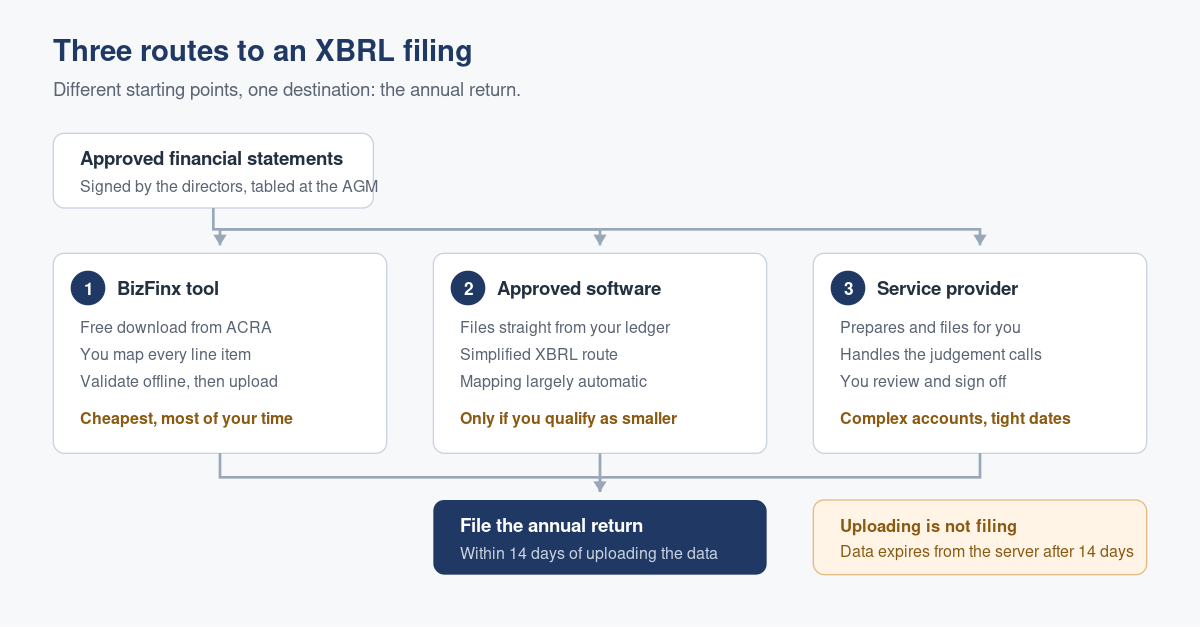
There are exactly three routes to an XBRL filing: prepare the file yourself in ACRA’s free BizFinx preparation tool, let approved accounting software generate and submit it straight from your ledger, or hand the whole job to a corporate service provider. All three end at the same place, the annual return.
Raffles Corporate Services works with a panel of experienced Singapore law firms who offer cost-effective and efficient legal service and advice. This article is general information only and is not legal advice.
Which route suits you is less about budget than about where your numbers already live. If your accounts are finalised in a spreadsheet, the free tool is a reasonable afternoon’s work. If your accounting system is on ACRA’s approved list, the file can come out of the system you already use with far less handling. If your year end is complicated, or late, the third route exists for a reason.
Here is what each route actually involves, followed by the step sequence that catches people out.
Route one: the BizFinx preparation tool
BizFinx is ACRA’s own preparation tool, and it is free. You download it, open your approved financial statements alongside it, map each line of your accounts to the corresponding element in ACRA’s taxonomy, validate the result offline, then upload the validated data to ACRA’s server.
The tool is not a bookkeeping system and it does not calculate anything for you. It is a structured translation exercise: your accounts on one side, ACRA’s dictionary of elements on the other, and your judgement in the middle deciding which of their labels your line item belongs under.
This route suits a company with straightforward accounts, a person available who understands what the line items mean, and enough time before the annual return deadline to redo a section if validation complains. It does not suit somebody meeting a deadline tonight for the first time.
If you have several companies to file
Groups and family offices filing for multiple entities can upload more than one prepared file at a time using ACRA’s multi-upload tool, rather than repeating the upload step entity by entity. The preparation work is still per entity. Only the submission step is batched.
Route two: approved accounting software
ACRA maintains a list of accounting software that can prepare and file an annual return in Simplified XBRL format directly, using ACRA’s filing interface. Where your system is on that list and your company qualifies for Simplified XBRL, the file is generated from the ledger you have already closed and submitted without a separate preparation step.
This is the quietest route, and it is the one most likely to become the default for smaller companies over the next few years. Two conditions apply. Your company must be eligible for Simplified XBRL in the first place, which turns on the size and public accountability tests set out in our guide to XBRL requirements and exemptions. And your chart of accounts has to be tidy enough that the automatic mapping produces something you are willing to sign off, because the output is still your filing and your responsibility.
Route three: a corporate service provider
The third route is to engage a corporate service provider or accounting firm to prepare and file on your behalf. You supply the approved financial statements and the provider does the mapping, the validation, the upload and, usually, the annual return itself.
What you are buying is not typing. It is the judgement calls: whether a particular reserve movement belongs under one taxonomy element or another, whether a validation warning is a genuine error or a false positive that can be acknowledged, and whether the accounts themselves are ready to be filed at all. Working relationships of this kind go better when the brief is clear on both sides, which is the subject of our note on working effectively with an outsourced accounting firm.
The three routes side by side
| BizFinx preparation tool | Approved accounting software | Corporate service provider | |
|---|---|---|---|
| Direct cost | None, the tool is free | Included in your software subscription | A professional fee |
| Your time | Highest, you do the mapping | Lowest, mapping is largely automatic | Low, you supply the accounts and review |
| Works for Full XBRL | Yes | Simplified XBRL filing route | Yes |
| Best suited to | Simple accounts, time in hand, an in-house finance person | Companies whose ledger is already in a listed system | Complex accounts, groups, tight deadlines, first filings |
| Who carries the judgement calls | You | You, reviewing what the system produced | The provider, with your sign-off |
| Main risk | Mapping errors found late | Chart of accounts feeding the wrong elements | Late handover of final accounts |
The step sequence, in order
If you are taking the BizFinx route yourself, the order matters. Steps three and six are where most of the wasted time happens.
- Download the free preparation tool from ACRA and install it.
- Have your AGM financial statements to hand. The tool treats them as your source document, and it will accept them in Word or Excel format. If you are filing Full XBRL, the complete set of statements goes into a single text block element, and what you put there must be legible, complete and identical to what was tabled at the AGM or circulated to members. That text block is converted to PDF and attached to the company’s publicly purchasable annual return extracts, so treat it as a public document.
- Map your line items to the ACRA taxonomy. Complete every tab in the template. Leave a field blank only where the information genuinely is not disclosed in your financial statements, rather than because you are unsure where it belongs.
- Validate offline. The tool runs its checks and reports two kinds of problem. Genuine errors must be fixed before you can file, unless your financial statements are correct and you apply to ACRA for relief from the specific requirement. Possible errors are warnings: review each one, correct what is wrong, and if your data is right, acknowledge the warning and carry on.
- Upload the validated data to ACRA’s server using the tool’s validate and upload function.
- Confirm and acknowledge the upload. You will see a confirmation message. This is not your filing.
- File the annual return with the uploaded XBRL attached, within 14 days. Uploaded XBRL data sits on ACRA’s server for up to 14 days and then falls away, and if it does you prepare and upload again.
That last point is the single most common piece of wasted effort in this whole process. Uploading is not filing. The obligation is the annual return under section 197 of the Companies Act 1967, and an uploaded file with no annual return behind it protects nobody.
What goes wrong in practice
The accounts are not final. Every route assumes a set of financial statements that the directors have approved. If the audit is still open, or a provision is still being argued about, XBRL preparation is premature. Preparing against a draft and then re-preparing against the final version doubles the work and invites version confusion.
Mapping by name rather than by meaning. Taxonomy elements have defined meanings, and two elements can have similar sounding labels. The discipline is to read the definition, not to match words. A miscoded item can survive validation cleanly and still misstate what the company reported.
Treating every warning as an error. Validation flags possible errors that are often perfectly correct disclosures for your business. Chasing them all down is a common way to lose a day. Read them, decide, acknowledge, proceed.
Filename trouble at the last screen. Where a PDF of the financial statements is also required, Bizfile is particular about the filename. Keep it to plain letters and numbers with no spaces, full stops, ampersands or accented characters. This is a five second fix that reliably arrives at the worst moment.
Leaving it until the deadline week. The annual return deadline is fixed, and the XBRL data expires from the server after 14 days. Compress both into the same week and any single problem, an unavailable director, a validation error, a software update, becomes a late filing. Late lodgement penalties follow, and they are avoidable.
Frequently asked questions
Do I need to buy software to file XBRL financial statements?
No. ACRA’s BizFinx preparation tool is free to download and use, and it can produce both Full and Simplified XBRL files. Paid accounting software and professional help are conveniences that save you time and reduce the risk of mapping errors. They are not a legal requirement, and a company with simple accounts can file entirely with the free tool.
How long does uploaded XBRL data stay on ACRA’s server?
Up to 14 days. Once you have uploaded and acknowledged the file, you have that window to file the annual return and attach it. If the annual return is not filed within the window, the uploaded data is no longer available and the preparation and upload steps have to be repeated. Uploading is not itself a filing.
Can my corporate secretary file XBRL for me?
Yes. Engaging a corporate service provider to prepare and file XBRL financial statements on the company’s behalf is one of the three routes ACRA recognises. The directors remain responsible for the financial statements and for the accuracy of what is filed, so review the mapped output before it goes in rather than after.
What is the difference between a genuine error and a possible error in validation?
A genuine error breaches a validation rule and must be corrected before filing, unless the financial statements are correct and ACRA grants relief from that specific requirement. A possible error is a warning that the data looks unusual. If you have checked it and your figures are right, you can acknowledge the warning and file.
Can I file XBRL for several companies at once?
The preparation work is per company, but the upload step can be batched. ACRA’s multi-upload tool lets you submit multiple prepared XBRL files together, which saves time for groups and for service providers handling a number of entities. Each company still needs its own annual return filed separately.
Getting the sequence right the first time
The XBRL file is the last link in a chain that starts with bookkeeping and runs through the reporting framework you apply, the financial statements themselves, and the AGM. If you want the wider picture, start with our overview of filing financial statements in XBRL format, then the guide to what a Singapore company must produce at year end, then the annual return filing steps in Bizfile. If you are not yet set up to file at all, our note on logging in to Bizfile as a business user covers the Corppass step that comes before everything else.
Raffles Corporate Services prepares and files XBRL financial statements for Singapore companies as part of the annual compliance cycle, which means the mapping is done by the same people who know what the accounts are saying. If your year end is coming and nobody has yet decided which of the three routes you are taking, that decision is worth making early.
You can reach us through Raffles Corporate Services, or read more on Singapore corporate secretarial practice at Singapore Secretary Services.
— The Editorial Team, Raffles Corporate Services
Need help with this?
Raffles Corporate Services can handle the ACRA filings, compliance documentation and records for you, and where court proceedings or legal advice are needed, we work with a panel of experienced Singapore law firms who offer cost-effective and efficient legal service and advice.
Email: [email protected]
Call, SMS or WhatsApp: +65 8501 7133