
The BizFinx Preparation Tool is ACRA’s free desktop application for turning a set of signed financial statements into the XBRL file that Bizfile will accept. It runs on Windows, on top of Microsoft Excel, and it does three jobs: it gives you the template, it maps your figures to ACRA’s taxonomy, and it validates the result before you upload.
Raffles Corporate Services works with a panel of experienced Singapore law firms who offer cost-effective and efficient legal service and advice. This article is general information only and is not legal advice.
That last job is the one that matters. Uploading an invalid XBRL file to Bizfile at 11pm on the night before your annual return is due is a bad way to discover a mapping error. The Prep Tool exists so you find those errors on your own machine, at a time of your choosing.
This guide covers which version you need, what your computer has to have, the setup order, and where companies lose a week they did not budget for. If you are still deciding whether XBRL applies to you at all, start with who must file XBRL financial statements.
What the tool actually does
An XBRL filing is not a PDF of your accounts. It is a structured data file in which every figure carries a tag identifying what it represents, so that ACRA’s systems can read a Singapore company’s revenue line without a human opening the document.
The Prep Tool is the bridge between the two. In practice it gives you:
- A template, opened inside Excel, with the statements and elements ACRA expects for your filing type.
- A mapping layer, where you attach each line of your own trial balance or financial statements to the correct taxonomy element.
- Offline validation, which checks the file against ACRA’s business rules and lists the errors before you go anywhere near Bizfile.
- An output file, which you then upload as part of your annual return or your financial statements filing.
It is a preparation tool, not a filing tool. The actual lodgement still happens in Bizfile. The distinction matters when somebody says the filing is “done” because the Prep Tool ran cleanly.
Which version you need
There are two live versions, and they are not interchangeable.
| Version | Use it for | Do not use it for |
|---|---|---|
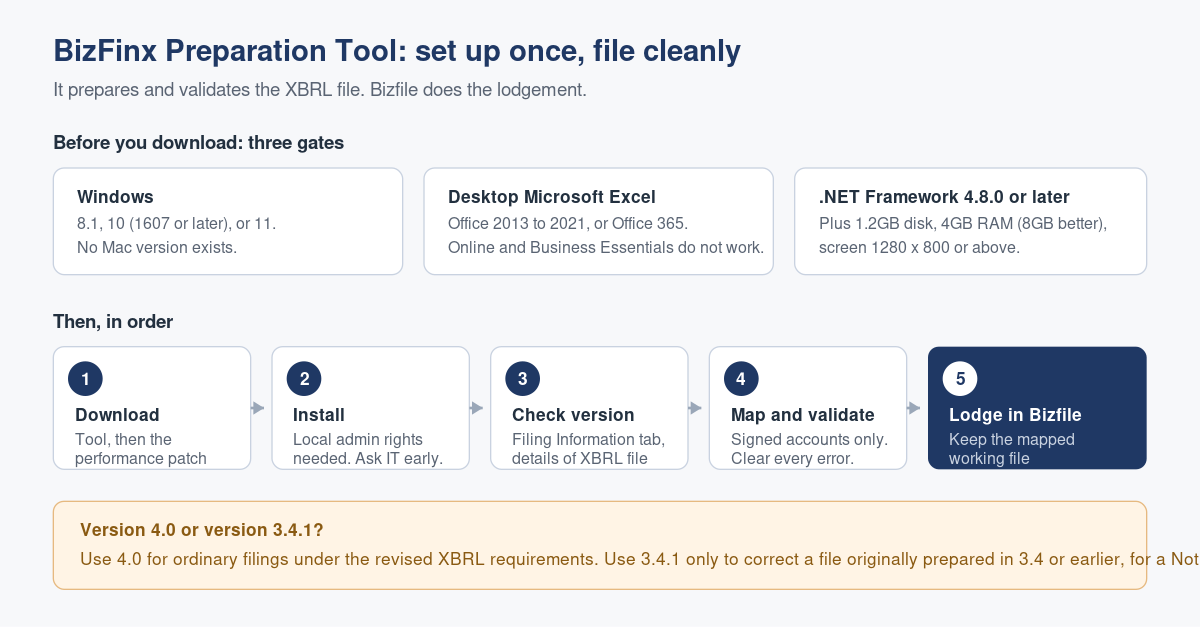
| Version 4.0 | Preparing financial statements under the revised XBRL filing requirements. This is the version for ordinary current filings. | Correcting an XBRL file that was originally prepared in version 3.4 or earlier |
| Version 3.4.1 | Correcting errors in XBRL financial statements that were prepared using version 3.4 or earlier, as part of a Notice of Error | New filings under the revised requirements |
Version 4.0 also has a separate performance patch. Download the patch as well as the tool; it is a second file, and skipping it is a common reason the application feels unusably slow on a modest machine.
To check which version you are running, open the Filing Information tab and look under the details of the XBRL file. Do that before you start work, not after, because a template prepared in the wrong version is not salvageable by copy and paste.
If you are correcting something already lodged, the version question is downstream of a different decision, and our guide to fixing a wrong ACRA filing with a Notice of Error covers what you are actually applying for.
System requirements, in plain terms
Both current versions carry the same requirements. Check them before you download, because the tool will not tell you politely.
| Component | What you need |
|---|---|
| Operating system | Windows 8.1, Windows 10 (version 1607) or later, or Windows 11. Technical support is limited to these. |
| Processor | Intel Core i3 or above, or a non-Intel processor running at 2.0 GHz or above |
| RAM | 4GB or more, with 8GB recommended, on 64-bit Windows |
| Disk space | 1.2GB for installation and normal use. You can delete the installer afterwards. |
| Screen resolution | 1280 x 800 or above |
| Microsoft Office | Office 2013, 2016, 2019, 2021, or Office 365. Office 365 Business Essentials and Office 365 Online are not supported. |
| Microsoft .NET Framework | Version 4.8.0 or later |
The two that catch people
There is no Mac version. The Prep Tool is a Windows application. A Mac-only finance team needs a Windows machine, a virtual machine or a colleague, and that is a procurement problem, not a five-minute problem. Find out in November, not in the week the annual return is due.
Web-only Office does not work. A company running Office 365 Online, or Business Essentials, has a browser-based Excel. The Prep Tool needs the installed desktop application. This is the single most common blocked installation we see, because the company genuinely does have a Microsoft 365 subscription; it just has the wrong one.
The setup and preparation sequence
- Confirm your filing obligation and template. Full XBRL, simplified XBRL or financial statements highlights, depending on your company, under ACRA’s XBRL filing requirements and exemptions. Getting this wrong wastes the entire preparation. See filing financial statements in XBRL.
- Check the machine against the table above, including the Office edition and the .NET version.
- Download the Prep Tool from ACRA’s XBRL filing tools pages, then download the performance patch. Two separate files.
- Install with local administrator rights. On a managed corporate laptop this usually needs IT, which is a lead time, not a click.
- Open the tool and confirm the version on the Filing Information tab before entering anything.
- Enter the filing information, then map your financial statements to the taxonomy elements.
- Run validation offline and clear every error. Warnings deserve a decision, not a shrug.
- Save the output file, then lodge it through Bizfile with the relevant transaction.
- Keep the working file. If ACRA queries the filing, or you need a Notice of Error later, the mapped source file saves you rebuilding it from scratch.
If you file for many entities, the Prep Tool is not the only route: there is a separate multi-upload tool aimed at agents, and accounting software can generate the file directly. Our comparison of the ways to produce your XBRL financial statements sets out when each is worth it, and which XBRL filing tool you actually need covers the full toolset.
What goes wrong in practice
The tool is installed the week the filing is due. Installation is not the hard part. The hard part is the administrator rights, the Office edition, the .NET update and the reboot, each of which is somebody else’s queue. Install it a month early and open it once.
The accounts are not final. Mapping a draft set of financial statements and then receiving revised audited figures means redoing the mapping. Wait for the signed accounts.
Mapping is treated as data entry. Choosing the taxonomy element for a line item is an accounting judgment. A misclassified balance produces a file that validates cleanly and is still wrong, and it is wrong in a structured, machine-readable way that ACRA can compare against your prior year.
Validation warnings are ignored. An error blocks you. A warning does not, which is precisely why warnings get skipped. Each one is the tool telling you that something in the file is unusual, and unusual is what draws a question later.
Nobody saved the working file. Twelve months on, when a Notice of Error is needed, the original mapped file has gone with the laptop of the person who prepared it. Save it to the company’s own storage, with the year end in the filename.
The filing deadline is missed while troubleshooting. The Prep Tool has no bearing on your annual return deadline. Late filing carries its own penalties regardless of why the file was not ready. See annual return deadlines and what late filing costs.
If the tool simply will not install or run, work through our dedicated troubleshooting piece on when the BizFinx Preparation Tool will not work before you rebuild the machine.
Frequently asked questions
Is the BizFinx Preparation Tool free?
Yes. ACRA provides the Prep Tool and its performance patch as free downloads, and using it carries no separate charge. What you pay is your own time, or your accountant’s. The fees you encounter are the ordinary ACRA transaction fees for the filing itself, not for the tool.
Does the Prep Tool file my financial statements with ACRA?
No. It prepares and validates the XBRL file only. Lodgement happens separately in Bizfile, as part of your annual return or financial statements filing. A clean validation in the Prep Tool is not a filing, and treating it as one is how deadlines get missed.
Can I run the Prep Tool on a Mac?
Not directly. It is a Windows application that requires desktop Microsoft Excel. Mac users need Windows through a virtual machine, a separate Windows computer, or a service provider who files on their behalf. Sort this out well before your filing month, because it is a hardware problem, not a settings problem.
Which version should I download?
Use version 4.0 for ordinary filings under the revised XBRL filing requirements. Use version 3.4.1 only when you are correcting errors in XBRL financial statements that were originally prepared using version 3.4 or earlier, as part of a Notice of Error. Check the version on the Filing Information tab before you start.
Why does my validation pass but ACRA still queries the filing?
Validation tests the file against business rules. It does not test whether you mapped your revenue to the right taxonomy element, or whether the accounting itself is right. A structurally valid file containing a misclassified balance is exactly the sort of thing that surfaces later, when ACRA compares this year against last.
Where this usually belongs
For most small companies, the Prep Tool is a once-a-year piece of software that nobody becomes good at. The person who used it last year has forgotten it, the laptop has been replaced, and the whole exercise is re-learned each December.
Raffles Corporate Services prepares and files XBRL financial statements for Singapore companies as part of the year end cycle, keeps the mapped source files so corrections are quick, and works from signed accounts so nothing is mapped twice. If your XBRL filing has become an annual scramble, it is worth moving it into the same process that produces your accounts.
You can reach us through Raffles Corporate Services, or read more on Singapore corporate secretarial practice at Singapore Secretary Services.
— The Editorial Team, Raffles Corporate Services
Need help with this?
Raffles Corporate Services can handle the ACRA filings, compliance documentation and records for you, and where court proceedings or legal advice are needed, we work with a panel of experienced Singapore law firms who offer cost-effective and efficient legal service and advice.
Email: [email protected]
Call, SMS or WhatsApp: +65 8501 7133