

There is no single XBRL filing tool. ACRA publishes a preparation tool and a multi-upload tool under the BizFinx name, maintains a list of approved accounting software that can file directly, and then takes the filing itself in Bizfile. Which one you need depends on one question: what are you trying to do this week?
Raffles Corporate Services works with a panel of experienced Singapore law firms who offer cost-effective and efficient legal service and advice. This article is general information only and is not legal advice.
Most of the confusion in XBRL filing comes from treating BizFinx as a single product. It is not. It is a family of free downloads, each doing one narrow job, sitting alongside a completely separate commercial route through accounting software. Pick the wrong one and you will spend an evening installing something that cannot do what you need.
This guide is the landscape. It sets out what each tool is for, which company should reach for which, and the version discipline that quietly ruins filings.
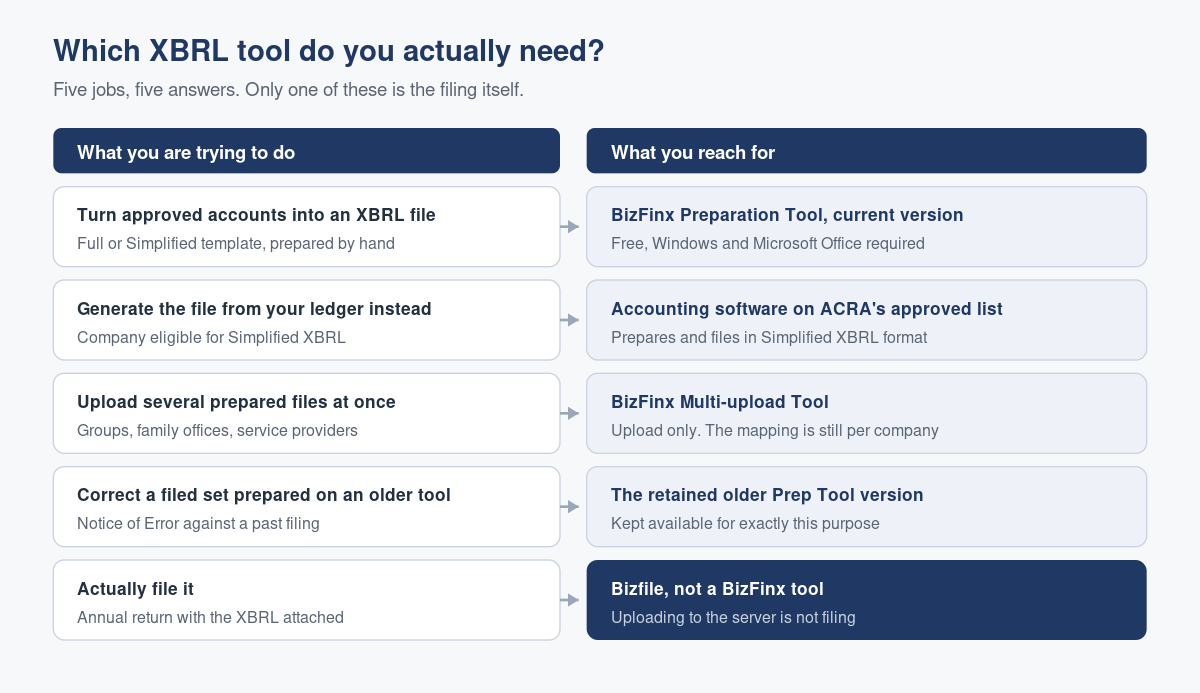
What each tool is actually for
The BizFinx Preparation Tool
This is the workhorse. It is a free Windows application that sits on top of Microsoft Office and turns a set of approved financial statements into a structured XBRL file by mapping each of your line items to an element in ACRA’s taxonomy. It validates the result against ACRA’s rules and then uploads the data to ACRA’s server.
It does not do bookkeeping, it does not calculate anything, and it does not file your annual return. What it produces is a file. What that file costs you in time is covered in our guide to what the preparation tool does to your accounts.
The BizFinx Multi-upload Tool
A separate, much smaller download that does exactly one thing: pushes one or more already prepared XBRL files up to ACRA’s server in a single run. It prepares nothing. If you have not already produced the files in the preparation tool or in approved software, this tool has nothing to work with.
It earns its place if you file for several entities: a group with subsidiaries, a family office, an accounting practice. For a single company filing once a year, it saves almost nothing.
Approved accounting software
ACRA maintains a list of accounting software that can prepare and file an annual return in Simplified XBRL format directly from your ledger, without a separate preparation step. This is not a BizFinx download. It is the system you already keep your books in, provided it is on ACRA’s list and your company qualifies for the Simplified XBRL template in the first place.
Eligibility is the gate. Whether your company files Full XBRL, Simplified XBRL, one of the financial statements highlights templates, or only a PDF turns on size and public accountability tests, which we set out in who must file XBRL financial statements and who does not.
Bizfile
Bizfile is where the annual return is filed and where the XBRL data you uploaded gets attached to it. It is not a BizFinx tool and it is not optional. If you are new to it, start with what Bizfile actually is and logging in as a business user through Corppass.
The tools side by side
| Tool | What it does | Who needs it | What it will not do |
|---|---|---|---|
| BizFinx Preparation Tool | Maps your accounts to the ACRA taxonomy, validates, uploads | Anyone preparing XBRL by hand | File your annual return |
| BizFinx Multi-upload Tool | Uploads one or more prepared files in a single run | Groups, family offices, service providers | Prepare or map anything |
| Approved accounting software | Generates and files Simplified XBRL from your ledger | Companies eligible for Simplified XBRL whose system is listed | Help you if you are not eligible |
| Bizfile | Takes the annual return with the XBRL attached | Every company that files | Prepare the XBRL for you |
| Training materials and troubleshooting guides | Explain the tools and fix installation failures | Anyone doing this for the first time | Replace judgement on mapping |
How to choose, in one pass
- Establish what your company must file. Full XBRL, Simplified XBRL, a banks or insurance highlights template, or a PDF only. Everything else follows from this, and getting it wrong wastes the entire exercise.
- Check whether your accounting system is on ACRA’s approved list. If it is, and you qualify for Simplified XBRL, that route removes the preparation tool from your life entirely.
- If not, download the current preparation tool. Confirm your machine meets the requirements before you start, not after.
- Count your entities. One company, upload from inside the preparation tool. Several, add the multi-upload tool.
- File the annual return in Bizfile and attach the uploaded data. Uploading is not filing, and the uploaded data does not sit on ACRA’s server indefinitely.
The three routes to a finished file, and the trade-offs between doing it yourself and handing it over, are compared in three ways to produce your XBRL financial statements.
The version problem nobody warns you about
The preparation tool and the multi-upload tool are versioned, and the version matters more than it looks.
ACRA refreshed both tools in February 2026 to support the revised XBRL filing requirements and the current ACRA taxonomy. The guidance with that release was not “upgrade when convenient”. It was to uninstall the old version first and then install the new one. Installing over the top is how people end up with a tool that behaves strangely and a support call that goes nowhere.
An older version of the preparation tool is still published, and it exists for one specific purpose: correcting errors in financial statements that were originally prepared on that older generation of the tool, which you would do by filing a Notice of Error. That is a repair route, not a filing route. If you are preparing this year’s statements on it, you are preparing them against a superseded taxonomy.
You can see which version produced a given file from inside the tool itself, on the filing information tab under the details of the XBRL file. Check it before you invest a day in mapping. ACRA’s own XBRL filing tools page carries the current downloads and release notes.
A note on the taxonomy
The tool is only half the story. The ACRA taxonomy is the dictionary your line items get mapped into, and it has versions too. Filings made under the revised requirements use the current taxonomy, and the technical guides, validation rules and guidance notes that go with it are published alongside the filing requirements and exemptions. A tool of the right version and a taxonomy of the wrong one is not a combination that ends well.
What goes wrong in practice
Installing on the wrong machine. The preparation tool is a Windows application that depends on a supported version of Microsoft Office and on the Microsoft .NET Framework. Web-only and cut-down Office subscriptions are not supported. Every year somebody discovers this at eleven o’clock the night before a deadline, on a Mac.
Assuming the multi-upload tool prepares files. It does not. Its whole function is submission. Downloading it in the hope that it will spare you the mapping is a wasted hour.
Uploading and calling it done. The data sits on ACRA’s server for a limited window and then falls away. If the annual return is not filed and the data not attached inside that window, the preparation and upload work is repeated from the beginning. Late filing then attracts a late lodgement penalty that nobody budgeted for.
Running last year’s tool. Tools and taxonomy move together. A file prepared on a superseded version can fail validation on upload, and the failure message is rarely as clear as “your tool is old”.
Letting the software decide the mapping. Where approved accounting software generates the file from your ledger, the output is only as good as your chart of accounts. It is still your filing and your directors’ responsibility. Review it before it goes, not after.
Frequently asked questions
Is there a Mac version of the BizFinx preparation tool?
No. The preparation tool is a Windows application that also requires a supported desktop version of Microsoft Office and the Microsoft .NET Framework. Mac users typically run it in a Windows virtual machine, use a cloud accounting system on ACRA’s approved software list, or engage a corporate service provider to prepare and file the XBRL on the company’s behalf.
Do I need both the preparation tool and the multi-upload tool?
Only if you are filing for more than one entity. The preparation tool can upload a file by itself. The multi-upload tool adds nothing for a single company. Groups, family offices and service providers use it to push several prepared files to ACRA’s server in one run, but the mapping work is still done separately for each company.
Does the BizFinx tool file my annual return?
No. It prepares and uploads XBRL data to ACRA’s server. The annual return is a separate filing made in Bizfile, where the uploaded data is attached. Uploaded XBRL data is only available for a limited period, so file the annual return promptly rather than treating the upload as the end of the task.
What does the approved software list actually get me?
If your accounting system is on ACRA’s list and your company qualifies for the Simplified XBRL template, the system can prepare and file the annual return in that format directly. You skip the download, the mapping and the separate upload. You do not skip reviewing what it produced.
How do I know which version of the tool made an existing file?
Open the file in the preparation tool and look at the filing information tab, under the details of the XBRL file. The version is recorded there. Check this before reusing last year’s file as a starting point, because a file built on a superseded taxonomy is not a safe base for this year’s filing.
Choosing once, properly
For most small Singapore companies the honest answer is that the tooling question should be settled once and then left alone. Either your accounts live in a system that can file Simplified XBRL directly, in which case use it, or they do not, in which case somebody prepares the file each year and that person should be the same person every year.
The expensive pattern is the third one: a different person, on a different machine, with a different version, every December. Our notes on when to move from do-it-yourself bookkeeping to professional support and on working effectively with an outsourced accounting firm are both really about the same thing: continuity.
Raffles Corporate Services prepares and files XBRL financial statements as part of the annual compliance cycle, on current tooling, by people who know what the numbers mean. If your year end is approaching and the tooling question is still open, settle it now rather than in filing week.
You can reach us through Raffles Corporate Services, or read more on Singapore corporate secretarial practice at Singapore Secretary Services.
— The Editorial Team, Raffles Corporate Services
Need help with accounting or bookkeeping?
If you would like accounting, bookkeeping or financial reporting support for your business, email [email protected] or WhatsApp +65 8501 7133.
Our accounting and tax advisers can assist. Where legal advice is needed, advisers from our associated law firms can also assist.