

An authorised position holder can remove a corporate service provider’s filing access from the entity’s Bizfile dashboard in about a minute. It is free, it takes effect immediately, and you only need the name of the provider you are removing.
Raffles Corporate Services works with a panel of experienced Singapore law firms who offer cost-effective and efficient legal service and advice. This article is general information only and is not legal advice.
The mechanics are the easy part. The part that goes wrong is everything around it: a registered office address that still belongs to the outgoing provider, a company secretary who has not formally resigned, a Corppass account nobody can administer, and statutory registers that were never handed over.
So here is the button, and then here is the order you should actually do things in.
What removing filing access does, and what it does not do
Your appointed corporate service providers appear on your Bizfile dashboard because they file transactions on behalf of your entity. Removing one revokes that authority. From the moment you confirm, that provider can no longer submit filings for your entity.
It does not do any of the following:
- It does not terminate your engagement letter or settle outstanding fees. That is a contractual matter between you and the provider.
- It does not remove anyone from your officer register. If the provider supplied your named company secretary or a nominee director, that person remains an officer of the company until a separate cessation is filed.
- It does not change your registered office address. If that address is the provider’s office, it is still your registered office on ACRA’s records until you file a change.
- It does not give you back anything the provider holds. Your statutory registers, constitution, resolutions and minute book need to be requested and received.
Treat the removal as the last step in a handover, not the first.
Who can remove a CSP, and what to prepare
Only an authorised position holder of the entity can do this. In practice that means a director or company secretary who has access to the entity’s Bizfile dashboard. If you have never used the dashboard, that access comes through Corppass, and setting it up is a separate exercise covered in our guide to setting up Corppass for a new company.
| What you need to know | Detail |
|---|---|
| Who may remove | Authorised position holders, typically a director or company secretary |
| What to prepare | The name of the CSP whose access you are removing |
| Login route | Corppass, as a business user |
| Fee | Free |
| Processing time | Immediate |
| Who gets told | The Qualified Individuals registered to that CSP, via their Bizfile Inbox |
There is no approval step and no waiting period. This is a dashboard permission, not an application.
The steps, in order
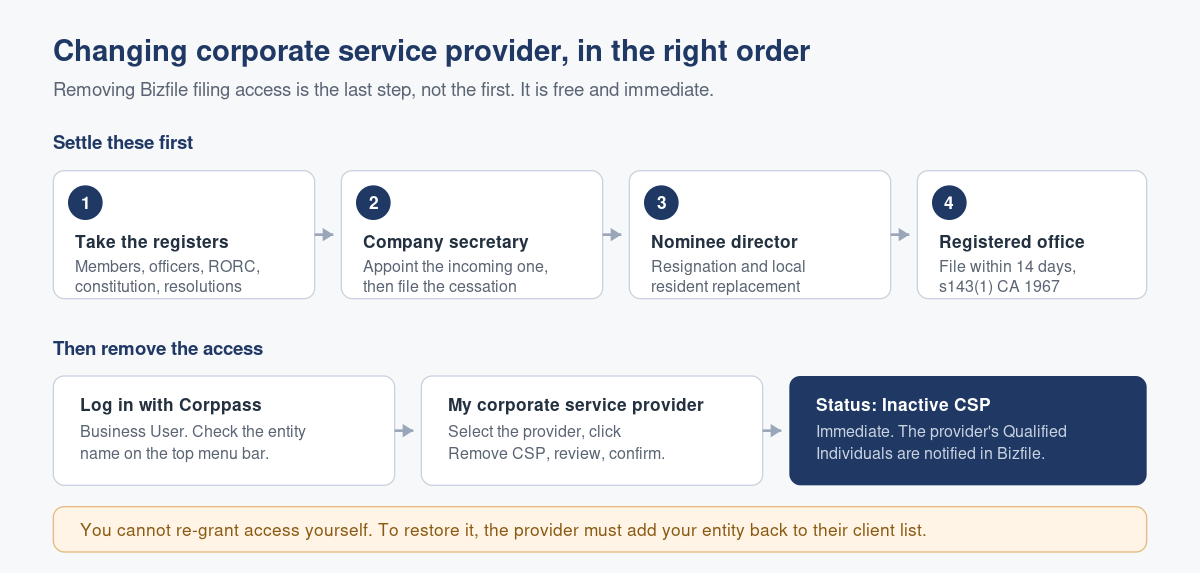
- Log in to Bizfile using your Corppass credentials as a Business User. If you are unsure which login route applies to you, our note on logging in to Bizfile as a business user sets out the difference between the Singpass and Corppass routes.
- Check the entity name shown on the top menu bar and on the dashboard. If you hold positions in more than one entity, switch to the right one before you touch anything. Removing the wrong provider from the wrong entity is recoverable but embarrassing.
- Open My corporate service provider (CSP) from the dashboard.
- Select the provider you want to remove and click Remove CSP.
- Read the provider’s details on the confirmation screen and check them against the name you prepared. Once you confirm, that provider cannot file for your entity.
- Confirm. The provider’s status on the page changes to Inactive CSP.
The Qualified Individuals registered to that provider receive a notification in their Bizfile Inbox telling them the access has been removed. They will know. It is worth telling them yourself first, in writing, so the notification is confirmation rather than news.
Reversing it, or reinstating a provider
You cannot re-grant access from your own dashboard. If you remove a provider and then need them back, the provider has to add your entity to their client list again. That is a filing on their side, not yours. So a removal made in error is fixable, but only with the cooperation of the party you just removed.
The four filings to settle before you click remove
This is the sequence that keeps a change of provider clean. None of these steps is optional if the item applies to you.
- Get the registers and the corporate file. The register of members, register of directors and officers, register of registrable controllers, constitution, share certificates, signed resolutions and minutes. Ask for the RORC and nominee register data in a usable form, not a PDF of a screenshot. If you cannot reconstruct your own register history from what you receive, say so before the relationship ends, not after.
- Deal with the company secretary. A Singapore company must have a company secretary, and the office cannot sit vacant indefinitely. If the outgoing provider supplied the secretary, the cessation and the new appointment need to be filed. Sequencing matters: appoint the incoming secretary, then file the cessation of the outgoing one.
- Deal with any nominee director. If a nominee director was provided as part of the service, that resignation has its own difficulties, particularly if the company cannot immediately replace the local resident director. Our note on the trapped nominee director’s exit covers what happens when that goes wrong.
- Move the registered office address. If your registered office is the outgoing provider’s address, you must file the change, and the filing deadline is 14 days from the change under section 143(1) of the Companies Act 1967. Late filing attracts a late lodgement penalty of $50 within three months and $200 beyond that. This is the single most commonly missed item in a provider change, and it also means ACRA correspondence continues going to an office that is no longer working on your file.
Once those four are settled, removing the filing access is genuinely the trivial step it looks like.
What goes wrong in practice
The gap. Access is removed on the last day of the month, the incoming provider has not yet added the entity to its client list, and an annual return falls due that week. Nobody is positioned to file. The annual return late penalty is $300 if you are up to three months late and $600 beyond that, and it is applied automatically when the filing eventually goes through. Confirm the incoming provider has you on their client list before you remove the outgoing one.
The Corppass orphan. The only person with Corppass administrator rights for the entity was a staff member at the outgoing provider, or a former employee who has left. Nobody can grant the incoming provider access, and nobody can file. Sorting out Corppass administration takes time you may not have. Our note on who should have Bizfile access and which e-service roles to assign is worth reading before a handover rather than during one.
The register that does not match ACRA. The handover file shows one shareholding, the ACRA register shows another, usually because a transfer was agreed commercially and never lodged. Find this at handover, when both providers can still explain their records, rather than two years later during a due diligence exercise.
The assumption that removal ends the obligations. It does not. Your provider’s own duties under the Corporate Service Providers Act 2024, including record retention, continue past the end of the engagement, and so do yours as a director. Our Corporate Service Providers Act 2024 compliance FAQ explains where those duties sit.
ACRA’s own pages on removing filing access for an appointed CSP and on how providers maintain client lists set out the Bizfile mechanics from the regulator’s side.
Frequently asked questions
Is there a fee to remove a CSP’s filing access in Bizfile?
No. Removal is free and takes effect immediately, with no approval step. You need only the name of the provider you are removing and Corppass access to the entity’s Bizfile dashboard as an authorised position holder.
Who is allowed to remove a corporate service provider?
An authorised position holder of the entity, which in practice means a director or company secretary who has access to the entity’s Bizfile dashboard. A staff member without the relevant Corppass e-service role cannot do it, and neither can the incoming provider on your behalf.
Does the outgoing provider find out?
Yes. The Qualified Individuals registered to that provider are notified through their Bizfile Inbox once the access is removed, and the provider’s status on your dashboard changes to Inactive CSP. Tell them yourself in writing first, so the notification confirms something already agreed.
Can I reverse the removal if I did it by mistake?
Not from your own dashboard. To restore access, the provider has to add your entity back to their client list, which is a filing on their side. Check the provider’s details on the confirmation screen before confirming, particularly if you hold positions in several entities.
Do I still need to change my registered office address?
Yes, if your registered office is the outgoing provider’s address. That is a separate filing, due within 14 days of the change under section 143(1) of the Companies Act 1967, with a late lodgement penalty of $50 within three months and $200 after that. Removing filing access does not move the address.
What happens to my company secretary when I change provider?
Nothing automatic. If the outgoing provider supplied your named secretary, that person remains on the register until a cessation is filed. Appoint the replacement first, then file the cessation, so the office is never left vacant while a filing deadline is running.
Changing provider without a gap
A provider change should be invisible from the outside. Same registers, same deadlines met, no late penalty, no month where nobody can file. That is entirely achievable, and it is mostly a matter of doing four things in the right order.
Raffles Corporate Services takes over Singapore company files regularly, and we handle the transition rather than handing you a checklist: we reconcile your registers against ACRA’s records, take the secretarial appointment, file the registered office change inside the 14-day window, and only then ask you to remove the previous access. If you are mid-handover and something does not add up, that is a short conversation.
You can reach us through Raffles Corporate Services, or read more on Singapore corporate secretarial practice at Singapore Secretary Services.
— The Editorial Team, Raffles Corporate Services
Need help with corporate secretarial or compliance matters?
If you would like help with your company's corporate secretarial, governance or compliance requirements, email [email protected] or WhatsApp +65 8501 7133.
Our team can assist with corporate secretarial, accounting and tax matters. Where legal advice is needed, advisers from our associated law firms can assist.