

To correct or update a nominator’s details in ACRA’s Central ROND or RONS, you reopen the same eService you used to add them, overwrite the field and submit. There is no notice of error, no fee, and no waiting. The record changes the moment you file.
Raffles Corporate Services works with a panel of experienced Singapore law firms who offer cost-effective and efficient legal service and advice. This article is general information only and is not legal advice.
That simplicity hides two traps. The first is the deadline, which is much tighter than most people assume. The second is that ROND and RONS data lives separately from the rest of your company’s record, so correcting a nominator’s address in one place does not correct it anywhere else.
This guide is about the change-of-particulars workflow: what triggers it, what else you have to file alongside it, and what the register looks like afterwards.
What counts as a change worth filing
A nominator’s particulars are not static. People move house, change phone numbers, take a new passport, marry and change their name, or naturalise and change nationality. Corporate nominators are restructured, redomiciled and renamed. Any change to a field you originally filed is a change you must record.
| For an individual nominator | For a corporate nominator |
|---|---|
| Full name and aliases | Entity name |
| Residential address | Registered office address |
| Email address and contact number | Email address and contact number |
| Nationality | Legal form of the entity |
| NRIC or passport number | Jurisdiction and governing law of incorporation |
| Date of birth | Corporate registry and registration number |
| Date of becoming a nominator | Date of becoming a nominator |
| Date of cessation, if applicable | Date of cessation, if applicable |
Two entries deserve a second look. A change to the date of becoming a nominator is almost always a correction rather than a change of fact, since the date a nomination started does not move. A change to the date of cessation is the end of the arrangement, covered in our guide to ceasing an existing nominator.
Corrections and changes are the same transaction
Singapore’s filing regimes usually distinguish between a change of circumstance and a mistake, and a mistake often needs a notice of error with a fee or an approval step attached.
ROND and RONS do not work that way. If you filed the wrong passport number, transposed two digits in a date of birth, or attached a nominator to the wrong nominee, the remedy is to open the eService, correct the entry and resubmit. No notice of error is required. Your records update immediately on submission.
That means there is no excuse for leaving a known error in place while you work out the procedure. If you spot it, fix it that day.
The clock on an edit
The timing rule is the same as it is for adding a nominator, and it is the part that catches companies out.
- You are informed of the change, or you discover the error.
- You update your private ROND or RONS. The statutory window for updating the private register on a change in a nominator’s particulars is seven days from being informed.
- You then file the same update to the Central ROND or RONS within two business days of updating the private register.
Note where the second clock starts. It does not run from the date the nominator moved house. It runs from the date you updated your own register. That sounds forgiving until you realise that updating the private register late does not buy you time on the central filing, it simply means you have missed two deadlines instead of one.
You cannot apply for an extension of time on a ROND or RONS filing. Late filing exposes the company to prosecution and fines of up to $25,000.
The filings that do not happen automatically
This is the single most valuable thing to understand about editing nominator details.
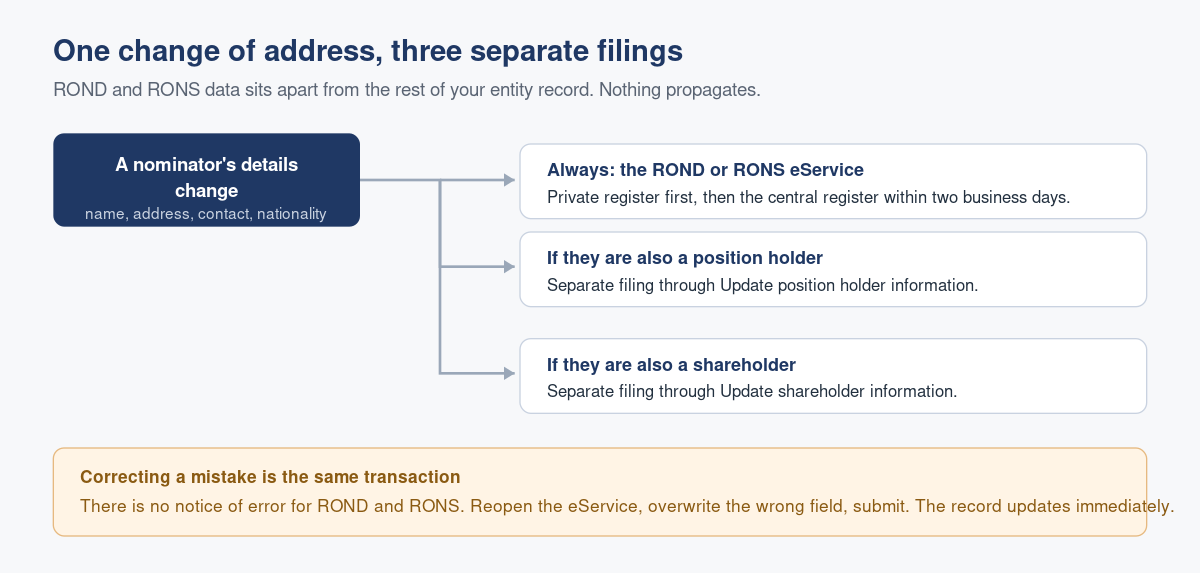
ROND and RONS information is stored separately from the rest of your entity’s information at ACRA. Updating a nominator’s address in the ROND does not update that person’s address anywhere else in your company’s record.
So if the nominator is also:
- A position holder in the company, such as a director or company secretary, you must separately file the change through the Update position holder information eService.
- A shareholder of the company, you must separately file the change through the Update shareholder information eService.
Three filings for one change of address is not unusual where a nominator wears several hats. The alternative is an entity record that contradicts itself, which is the kind of inconsistency that surfaces awkwardly during bank onboarding or due diligence.
If you are unsure which eService covers what, our overview of what Bizfile actually is and what you can and cannot do in it maps the territory, and who should have Bizfile access covers the Corppass roles that gate each one.
The edit, in order
You will need to be a position holder, a registered corporate service provider or a group secretary, logging in to Bizfile as a Business User through Corppass.
- Log in and confirm you are on the correct entity dashboard. Corporate service providers select the Corporate Service Provider profile first.
- Open the Update Registers of Nominee Directors and Nominee Shareholders eService and start.
- Confirm the entity’s exemption status and whether it has any active nominee directors or nominee shareholders.
- Under the Nominee Directors or Nominee Shareholders section, click the nominee’s name to expand the entry, then select the edit option.
- Change the fields that have changed, and save.
- Check that the entry now carries the “to be updated” marker rather than “to be added”. This is your confirmation that the system has understood it as an amendment to an existing record rather than a new nomination.
- Review the entered information, tick the declaration and submit.
- A confirmation lands in your Bizfile Inbox.
That marker in step 6 is worth pausing on. If an entry you meant to amend shows as “to be added”, you have created a duplicate nomination rather than corrected the existing one, and you will end up filing again to unwind it.
What trail does an edit leave
The Central ROND and RONS are not public documents, and edits are not published. But they are not invisible either, and it is worth being clear about what persists.
The central registers exist so that law enforcement agencies can investigate financial crime. What ACRA holds includes the history of what has been filed, not merely the current snapshot. Historical nominee arrangements are specifically listed as information that stays private, which tells you plainly that ACRA retains them rather than discarding them when an arrangement changes.
On the public side, the picture is narrow. A current director’s or shareholder’s nominee status shows as “ND” or “NS” in the company’s Business Profile. The nominator’s identity, the date of nomination and the history of changes are not available to the public, and members of the public cannot buy ROND or RONS information at all.
Your private register is the other half of the trail, and the half you control. Keep the supporting documents with it: the nominee’s written disclosure, the correspondence evidencing the change, the dated instruction from the nominator. You do not file these with ACRA, but if the Registrar or a public agency asks the company to produce the register and related documents, that is the file you will be reaching for.
What goes wrong in practice
The change is noticed at the annual review. A nominator moved eighteen months ago and nobody told the company. The seven-day and two-business-day windows are long past. Filing late is still better than not filing, and the correction itself is free, but the exposure has already crystallised. Build the question into onboarding and into every annual compliance cycle.
Editing the nominee instead of the nominator. The register records the nominee’s name and the nominator’s full particulars. If the director changes their own residential address, that is a position holder filing. If the person instructing them changes theirs, that is a ROND edit. Confusing the two is common and produces a register that no longer matches reality.
Creating a duplicate instead of amending. As above: watch the “to be updated” marker before you confirm.
Assuming a corporate restructuring is somebody else’s problem. When a corporate nominator is renamed or reincorporated elsewhere, several fields change at once: legal form, governing law, registry details. That is one edit with many fields, and it gets the same seven-day and two-business-day treatment as a change of phone number.
Treating a status change as an edit. If the nominee relationship has ended, that is a cessation, not a change of particulars. Filing an edit with a cessation date buried in it is not the same transaction as ceasing the nominator properly, which our cessation guide covers.
Frequently asked questions
Do I need to file a notice of error to correct a ROND or RONS mistake?
No. ACRA does not require a notice of error for ROND and RONS corrections. Open the Update Registers of Nominee Directors and Nominee Shareholders eService, amend the wrong information and submit. The record updates immediately. There is no fee and no approval step.
How long do I have to file a change in a nominator’s particulars?
Update your private register within seven days of being informed of the change, then file the same update to the Central ROND or RONS within two business days of updating the private register. No extension of time is available. Late filing can attract prosecution and fines of up to $25,000.
My nominator is also a director. Does one filing cover both records?
No. ROND and RONS data is stored separately from your other entity information. You file the nominator change through the ROND or RONS eService, and separately file the position holder change through the Update position holder information eService. If they are also a shareholder, that is a third filing.
Will my previous filings still be visible after I edit the record?
Not to the public. Historical nominee arrangements are private information that members of the public cannot access, and the public can only see the current nominee status of current officers and shareholders in the company’s Business Profile. ACRA retains the filing history for law enforcement purposes.
Does editing a nominator cost anything?
No. Editing an existing nominator in the Central ROND or RONS is free and processes immediately. The only cost exposure attaches to filing late, which has no fee but does carry the risk of prosecution and a fine of up to $25,000.
Can my corporate service provider make the edit for me?
Yes. Registered corporate service providers, position holders and group secretaries can all file. But the legal obligation and the enforcement exposure remain with the company, so it is the company that must satisfy itself the filing was made correctly and on time.
Keeping the register honest between events
A register is only useful if it is current, and nominator particulars go stale quietly. Nobody sends the company a notification when a nominator moves house.
Raffles Corporate Services maintains ROND and RONS for Singapore companies, puts the confirmation question to nominees and nominators on a fixed cycle rather than waiting to be told, and files both registers inside the statutory windows. If you have inherited a set of registers and are not certain they still reflect the arrangements in place, a reconciliation is usually a short exercise and always cheaper than an enforcement conversation.
Related reading: our guide to adding a new nominator, the Companies Act 1967 deep-dive FAQ, ACRA’s page on filing with the Central ROND and RONS, and the Registrar’s RORC, ROND and RONS guidance.
You can reach us through Raffles Corporate Services, or read more on Singapore corporate secretarial practice at Singapore Secretary Services.
— The Editorial Team, Raffles Corporate Services
Need help with corporate secretarial or compliance matters?
If you would like help with your company's corporate secretarial, governance or compliance requirements, email [email protected] or WhatsApp +65 8501 7133.
Our team can assist with corporate secretarial, accounting and tax matters. Where legal advice is needed, advisers from our associated law firms can assist.