
Adding a nominator to ACRA’s Central Register of Nominee Directors or Nominee Shareholders costs nothing and processes immediately. The filing itself takes minutes. What takes real work is assembling the nominator’s identity details correctly before you start, because that is what the register exists to capture.
A nominator is the person or entity standing behind the nominee. If your director acts on someone else’s instructions, that someone is the nominator. If your shareholder votes as told or passes dividends on, the person they answer to is the nominator. The Central ROND and RONS exist to record who that is, so law enforcement can trace ownership and control when it needs to.
This guide covers what to collect, how the identity fields differ between individual and corporate nominators, and where the filing goes wrong.
What a nominator actually is, in plain terms
Under Part 11A of the Companies Act 1967, a company must keep a register of directors who are nominees and a register of shareholders who are nominees, together with the particulars of the people who nominate them. Section 386AL deals with the register of nominee directors, and the register of nominee shareholders sits alongside it in the same Part.
A nominee director is an individual who acts as a director on behalf of someone else. A nominee shareholder is one who regularly votes on another person’s instructions, or receives dividends on another person’s behalf, or both.
The nominee has a duty to tell the company: on the date of incorporation if the arrangement already exists, or within 30 days of becoming a nominee if it starts later. If the nominee never tells you, you cannot file, and the company still carries the obligation.
What you must collect before you open Bizfile
The information you file with ACRA is the same information that should already be sitting in your private ROND and RONS. The central filing is a transcription of a register you are already required to keep at your registered office or at your corporate service provider’s office.
The required fields differ sharply depending on whether the nominator is a human being or a company.
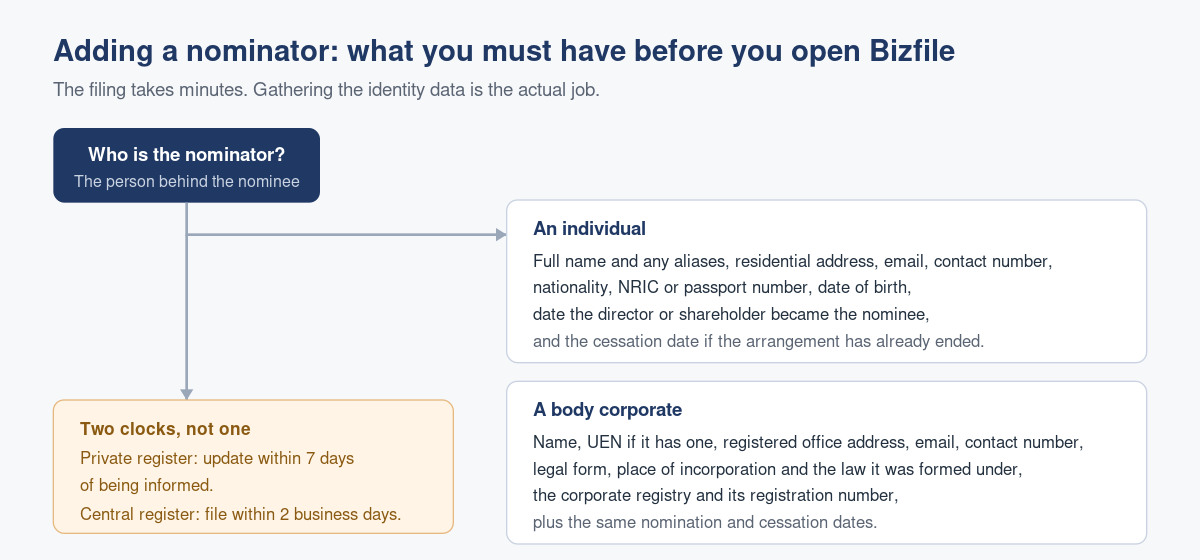
| Field | Individual nominator | Corporate nominator |
|---|---|---|
| Name | Full name, plus any aliases | Entity name |
| Identifier | NRIC or passport number | UEN if any, or foreign registration number |
| Address | Residential address | Registered office address |
| Contact | Email address and contact number | Email address and contact number |
| Personal or entity data | Nationality and date of birth | Legal form, jurisdiction of incorporation and the law it was formed under |
| Registry detail | Not applicable | Name of the corporate registry where it is registered, if applicable |
| Dates | Date of becoming a nominator, and cessation date if applicable | Date of becoming a nominator, and cessation date if applicable |
Two things surprise people here. You need the nominator’s residential address, not a business or care-of address. And you need aliases: if the nominator is commonly known by a second name, that belongs in the register.
You keep the supporting documents with your private register. You do not upload anything to ACRA.
The corporate nominator fields that cause the most trouble
If the corporate nominator is registered in Singapore, entering the UEN lets Bizfile retrieve the entity details for you. That path is easy.
If the nominator is a foreign entity, you enter a Foreign Business Registration Number and the entity name yourself. The FBRN field accepts letters and numbers only, so strip out hyphens, slashes, full stops and spaces. Where the foreign entity genuinely has no registration number, ACRA’s stated position is to enter “Not applicable” rather than leaving the field blank. Where the name of the corporate registry does not apply, enter “NA” for the same reason. Blank fields are what stop a submission going through.
The two clocks you are working against
- A director or shareholder tells you they are a nominee, or gives you their nominator’s particulars.
- You update your private ROND or RONS within seven days of being informed.
- You then file the same information with the Central ROND or RONS within two business days of updating the private register.
The second clock does not start at the event. It starts when you update the private register. In practice, treating the whole thing as a single task on the day you learn of the arrangement is the only reliable way to stay inside both windows.
There is no extension of time available for ROND and RONS filings. None. Late filing exposes the company to prosecution and fines of up to $25,000.
Who is allowed to file
You can file if you are a position holder such as a director or company secretary, a registered corporate service provider acting for the company, or the group secretary of a group of companies. You log in to Bizfile as a Business User through Corppass. Our guide to logging in to Bizfile as a business user covers that route, and who should have Bizfile access covers the e-Service role assignment that has to happen first.
One point deserves emphasis. Your corporate service provider can maintain the registers and do the filing, but the legal obligation stays with the company. Delegation moves the work, not the liability. The obligations that sit on the service provider’s side are set out in our Corporate Service Providers Act 2024 compliance FAQ.
The filing, in order
You use the Update Registers of Nominee Directors and Nominee Shareholders eService in Bizfile. The flow runs like this:
- Log in as a Business User and confirm you are on the correct entity dashboard. Corporate service providers select the Corporate Service Provider profile first, and the right firm if they act for more than one.
- Declare the entity’s exemption status. Exempt companies still have to tell ACRA they are exempt, and select the exemption category.
- Confirm whether the entity has any active nominee directors or nominee shareholders. If it has none, say so and the filing is a nil return.
- Add each nominator under the Nominee Directors section, then repeat under Nominee Shareholders.
- Enter the date of nomination. Today’s date or a past date only. Future dates are rejected.
- Save, check that each entry carries the “to be added” marker, then review and confirm.
- Tick the declaration and submit. Confirmation lands in your Bizfile Inbox.
On volume: you can add or update up to 50 nominators in a single transaction within a section, and ACRA’s guidance allows up to 100 nominee arrangements across both registers, split across one or more transactions. A company with more than that simply files again.
If one nominee has several nominators, or one nominator has several nominees, create a separate record for each nomination. You can select the same nominee more than once.
What goes wrong in practice
The disclosure never reaches the company. The nominee director signs the arrangement with the beneficial owner and nobody tells the corporate secretary. The register stays empty and the breach only surfaces when a bank or a regulator asks. The fix is procedural: ask the question at appointment, in writing, and again at each annual review.
Partial identity data. The nominator provides a name and a phone number and the company files what it has. Chase the full set before you open the eService, not halfway through it.
Confusing this filing with the appointment filing. Adding a nominator to the Central ROND does not appoint anyone. If the person is also being appointed as a director, that is a separate transaction through the Appoint or withdraw position holder eService. ROND and RONS data is held separately from the rest of your company’s information, so a change in one does not propagate to the other.
Assuming a dormant or exempt company is out of scope. The requirements apply even if the company has no nominees at all, and they continue to apply while a company is dormant, being wound up, struck off, in receivership or under judicial management. Exempt companies still have to declare their exemption.
Treating it as an annual task. It is event-driven, with a seven-day and a two-business-day window attached to each event, although you do also confirm exemption status when filing annual returns.
What becomes public once you file
Very little, and this reassures most nominators.
Once filed, a current director’s or shareholder’s nominee status appears as “ND” or “NS” next to their name in the company’s Business Profile, which anyone can buy. That is the extent of public disclosure. The nominator’s name and details, the date of nomination and any historical nominee arrangements stay private. Members of the public cannot buy ROND or RONS information, and nominee status does not surface through Bizfile’s people search.
If your arrangement raises broader questions about beneficial ownership, our piece on nominee shareholder arrangements in Singapore covers the legal risk side, and the Companies Act 1967 deep-dive FAQ covers the surrounding register obligations. Keeping a nominator’s details current afterwards is its own discipline: see our companion guides on editing an existing nominator and ceasing an existing nominator.
Frequently asked questions
What does it cost to add a nominator to the Central ROND or RONS?
Nothing. Adding, editing and ceasing a nominator are all free and process immediately. The cost exposure is entirely on the other side: filing late can attract prosecution and fines of up to $25,000, and no extension of time is available.
Can I backdate the date of nomination?
Yes, and often you must. The date of nomination should be the date the arrangement actually began, which is usually in the past by the time it reaches you. What Bizfile will not accept is a future date. If the arrangement starts next month, wait and file it then.
My nominator is a foreign company with no registration number. What do I enter?
Enter “Not applicable” in the foreign business registration number field. Do not leave it blank and do not invent a number. Where the name of the corporate registry also does not apply, enter “NA” in that field. The system is designed to accept these placeholders.
Does adding a nominator make my shareholder’s identity public?
No. The nominator’s name and particulars stay private. What becomes public is only that a current director or shareholder is a nominee, shown as “ND” or “NS” in the company’s Business Profile. The date of nomination, the nominator’s details and historical arrangements are not available to the public.
My company has no nominee directors or shareholders. Do I still have to file?
Yes. Unless the company is within an exemption category, it must still file and declare that it has no active nominee arrangements. This applies even if the company is dormant or in the middle of striking off. Exempt companies must separately inform ACRA of their exemption status.
Can my corporate secretary file this for me?
Yes. Position holders, registered corporate service providers and group secretaries can all file. But the legal obligation remains with the company, and the company is the one liable for enforcement if the filing is late or inaccurate.
Getting the disclosure before the deadline finds you
Most ROND and RONS breaches are not acts of concealment. They are a director who did not know they had to say anything and a company that did not know to ask. That is a process problem, and process problems are fixable.
Raffles Corporate Services asks the nominee question at appointment, captures the nominator’s full particulars while the person is still responsive, and files both registers inside the window rather than reconstructing the position later. If you are not confident your ROND and RONS reflect the arrangements actually in place, that is worth a conversation before someone else raises it.
You can reach us through Raffles Corporate Services, or read more on Singapore corporate secretarial practice at Singapore Secretary Services. ACRA’s own compliance page on setting up and maintaining ROND and RONS sets out the statutory position.
— The Editorial Team, Raffles Corporate Services