

Filing an ordinary resolution with ACRA is free, processed immediately, and takes about five minutes once you are logged in. You need the date of the meeting, a description of the resolution, and the signed resolution as a PDF. The transaction sits under the Notice of Resolution eService, and you pick the ordinary resolution type from a dropdown.
Raffles Corporate Services works with a panel of experienced Singapore law firms who offer cost-effective and efficient legal service and advice. This article is general information only and is not legal advice.
The mechanics are easy. Two things around them are not. The first is knowing whether your resolution needed a notice of resolution filing at all, because most ordinary resolutions do not. The second is the description field, which becomes part of your company’s permanent public record and is the one thing on the form you cannot quietly fix later. If you are not sure whether your resolution is lodgeable, start with our overview of which resolutions must be lodged with ACRA and why.
What an ordinary resolution is
The Companies Act 1967 defines the special resolution and leaves the ordinary resolution to work by default. Section 184 sets the special resolution threshold at a majority of not less than three-fourths of the members entitled to vote and voting. An ordinary resolution is everything else: a simple majority of the votes cast at a properly convened general meeting.
Where it is passed by written means instead, section 184A(4) gives the test precisely. An ordinary resolution is passed by written means if it does not indicate that it is a special resolution and it has been formally agreed by members representing a majority of the total voting rights of all members who would have had the right to vote on it at a general meeting, or a greater majority if the constitution requires one. Note the difference: at a meeting the majority is of votes actually cast; by written means it is of all the voting rights in the company.
Familiar examples include appointing a director under section 149B unless the constitution says otherwise, removing a director of a private company under section 152(9) or of a public company under section 152(1), and adopting the accounts at an annual general meeting.
When an ordinary resolution has to be filed
This is the part worth pausing on. Section 186(1) requires every special resolution to be lodged, and every resolution that effectively binds a class of shareholders. An ordinary resolution that does neither is not caught, and there is no general duty to send ACRA a copy of it. So the ordinary resolution filing is for the narrower set:
| Situation | Notice of resolution (ordinary)? | Note |
|---|---|---|
| Ordinary resolution that effectively binds a class of shareholders | Yes | Section 186(1)(b) applies regardless of the majority used |
| Private company resolution to dispense with holding AGMs | Yes | Named in section 186(1)(b); requires the agreement of all members voting, under section 175A(2) |
| Appointing a director by ordinary resolution | No | Notify ACRA through the change of officers transaction instead |
| Removing a director by ordinary resolution | No | Notify the cessation through the change of officers transaction |
| Adopting accounts or approving directors’ fees at an AGM | No | Not caught by section 186 |
| Ordinary resolution authorising a share allotment | No | Lodge the return of allotment instead |
The last rows are where the wasted effort goes. A resolution appointing a director is not what updates the register of directors; the officer change filing is. Our guide to allotting and transferring shares covers the equivalent point for share transactions.
Before you start: what to have on the desk
Access
You file as a business user, which means Corppass access to the entity, and Bizfile will show you the entity name on the top menu bar and the dashboard so you can confirm you are in the right company. A corporate service provider filing for a client switches to its CSP profile first and then selects the client entity. If Corppass is not yet in place, that is the prior step: see logging in to Bizfile as a business user and setting up Corppass for a new company.
Information
- The date of the meeting at which the resolution was passed, or the date it was formally agreed if it was passed by written means
- The nature of the ordinary resolution, which you select from a dropdown and then save before the rest of the form unlocks
- A description of the resolution, in your own words
- Where applicable, the date the meeting minutes were signed by a representative of the holding company
Documents
- The signed resolution, as a PDF of 5MB or less
- If you are also filing minutes signed by a representative of the holding company, that copy as a separate PDF, again 5MB or less
Filenames must contain letters and numbers only. Spaces, full stops other than the extension, ampersands, hash signs, dollar signs, percentage signs, asterisks and non-Latin characters will cause the upload to fail. This is the single most common reason a straightforward filing stalls. Rename Ordinary Resolution 30.09.2026 (signed).pdf to OrdinaryResolution30092026.pdf and it will go through.
The steps, in order
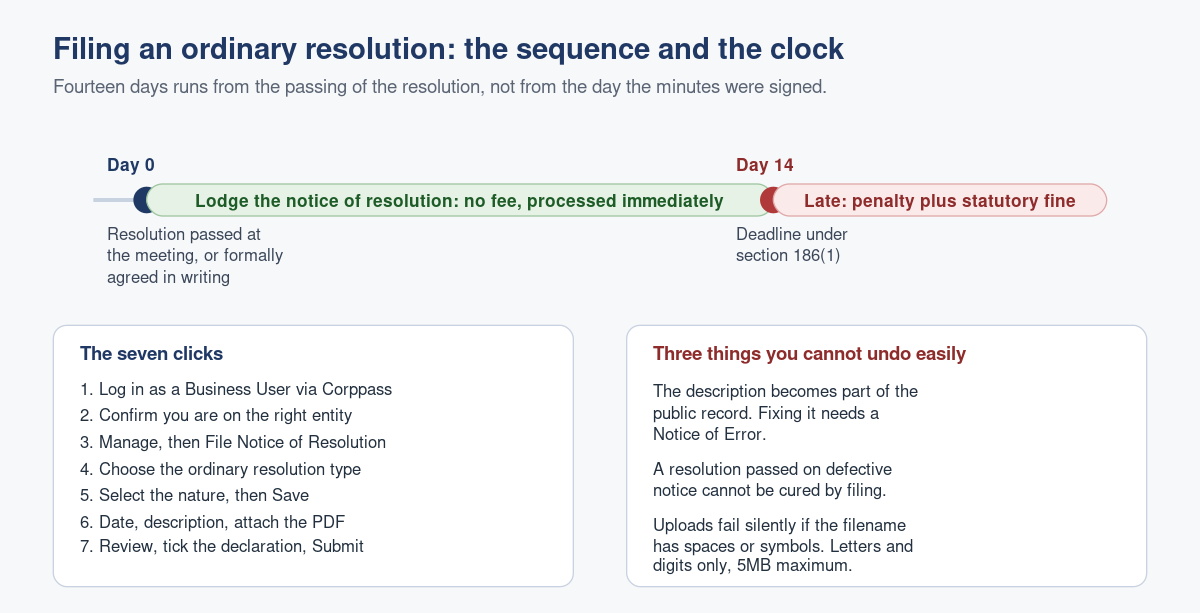
- Log in to Bizfile and select Business User to authenticate with your UEN and Corppass.
- Confirm you are on the correct entity dashboard. Check the entity name on the top menu bar and check that the status indicator confirms you are logged in as a position holder of that entity. If you hold positions in several companies, this is the step to slow down on.
- From the Manage menu, select the option to file a notice of resolution. You will land on the Notice of Resolution transaction page.
- Scroll to the bottom of that page and, under type of notice of resolution, select the ordinary resolution option. Then click to retrieve information, followed by Start, or Continue existing draft if you saved one earlier.
- Verify the entity details, select the applicable nature of ordinary resolution from the dropdown, and save. Then enter the date of the meeting and the description, and attach the resolution PDF.
- If you are filing a copy of minutes signed by a representative of the holding company, answer Yes to that question, enter the date the minutes were signed, and attach that PDF.
- Click Review and confirm, read the summary properly, tick the declaration confirming the accuracy of the information, and Submit.
- You will get an acknowledgement on screen, and a confirmation notice in your Bizfile Inbox.
There is no fee, and the filing is processed immediately.
What goes wrong, and what it costs
The description is written badly and cannot be withdrawn. What you type becomes part of the company’s public filing record. “Resolution passed” tells a future reader nothing, and neither does a description that lifts the whole operative clause and buries the point. Write one sentence identifying the decision and its date, the way you would want to read it during due diligence. The correction route is a Notice of Error, a separate filing.
The 14 days ran from the wrong date. Section 186(1) runs the clock from the passing of the resolution. Not from the date the minutes were typed up, not from the date they were signed off at the following meeting, and not from the date your corporate secretary received them. For a written resolution, it runs from the date the last required member’s agreement made up the majority.
The resolution was passed by written means when it could not be. Section 184A(2) excludes two categories from the written means procedure altogether: a resolution to dispense with annual general meetings under section 175A(1)(a), and any resolution for which special notice is required. If you circulated a written resolution for either, you do not have a valid resolution to file.
Special notice was missed. Removing a director of a public company under section 152(1) requires special notice, which section 185 sets at not less than 28 days before the meeting, with the company then notifying members alongside the notice of meeting or, failing that, at least 14 days before. The director must also be sent a copy immediately and is entitled to be heard at the meeting, whether or not they are a member. Skip that and the removal is open to challenge however clean the vote looked.
The wrong transaction was used for a constitutional change. If the resolution alters the constitution, it belongs in the Alteration of Constitution eService, because section 26(2) requires the altered constitution to be lodged with it. See our guide to filing an alteration of constitution.
Late filing. Section 186(3) makes default an offence, with the company and every officer in default each liable on conviction to a fine not exceeding $1,000 and also to a default penalty. ACRA separately imposes late lodgement penalties, per transaction.
If it was a special resolution, not an ordinary one
Check the notice of the meeting before you file. Section 184(1) requires the notice to have specified the intention to propose the resolution as a special resolution, with at least 14 days’ written notice for a private company or 21 days for a public company. If that wording was absent, you do not have a special resolution, whatever the voting margin was. If it was present and three-quarters voted in favour, you have a special resolution and it must be filed under section 186(1)(a) through the special resolution sub-transaction instead. Our guide to filing a special resolution covers that route.
Frequently asked questions
What is the difference between an ordinary and a special resolution?
An ordinary resolution needs a simple majority of the votes cast. A special resolution needs not less than three-fourths under section 184 of the Companies Act 1967, and the notice of the meeting must have specified the intention to propose it as a special resolution. Fourteen days’ notice for a private company, 21 for a public company.
Does filing an ordinary resolution cost anything?
No. ACRA charges no fee for the notice of resolution transaction and the filing is processed immediately. You will receive an on-screen acknowledgement and a confirmation in your Bizfile Inbox.
Do I have to file the ordinary resolution that appointed my new director?
No. The appointment itself is notified to ACRA through the change of officers transaction, which is what updates the register of directors. Filing the resolution instead leaves the public register showing your old board, which is the outcome you were trying to avoid.
Can my company secretary file this, or does it have to be a director?
Either. Company officers, including a director or the company secretary, may file on behalf of the company, and a corporate service provider may file for a client entity. What matters is Corppass authorisation for the relevant Bizfile e-service.
My PDF upload keeps failing. Why?
Almost always the filename. Bizfile accepts only letters and digits in the filename, so remove spaces, brackets, ampersands and full stops other than the file extension. Check the size too: each attachment must be 5MB or smaller.
I wrote the wrong description. Can I change it?
Not by resubmitting. The description forms part of the lodged record, and correcting it means filing a Notice of Error. Read the review screen carefully before you tick the declaration, because that screen is your last free opportunity.
Taking the filing calendar off your desk
An ordinary resolution filing is a five-minute job that costs money only when it is forgotten. The pattern is consistent: the decision is made properly, the paperwork is signed properly, and nobody owns the lodgement.
Raffles Corporate Services checks the majority and the notice period before your meeting, drafts the resolution, and files within the statutory window. If you are catching up on earlier years, we can reconcile your minute book against ACRA’s record and file what is outstanding. See also the Singapore company compliance calendar and our Companies Act 1967 deep-dive FAQ, or read more on Singapore corporate secretarial practice at Singapore Secretary Services.
— The Editorial Team, Raffles Corporate Services
Need help with corporate secretarial or compliance matters?
If you would like help with your company's corporate secretarial, governance or compliance requirements, email [email protected] or WhatsApp +65 8501 7133.
Our team can assist with corporate secretarial, accounting and tax matters. Where legal advice is needed, advisers from our associated law firms can assist.