

Every filing you make with ACRA leaves a dated record in Bizfile under My transactions. That record is your evidence that a submission was made, when it was made, and what happened to it. It is available for 30 days after approval or rejection, and then it is gone.
Raffles Corporate Services works with a panel of experienced Singapore law firms who offer cost-effective and efficient legal service and advice. This article is general information only and is not legal advice.
Most companies treat the transaction list as a status screen: check it once when you are waiting for something, forget it exists the rest of the year. That is a waste of the single best piece of contemporaneous proof you have that your company filed on time.
Auditors ask for it. Banks ask for it in due diligence. It is the first thing you want in your hand when ACRA says a filing was late and you are certain it was not. Here is how to read it, how to use it, and how to keep it before the window shuts.
What “My transactions” actually holds
It is the log of everything you have submitted or purchased through Bizfile under your login, with the status of each item and the detail behind it.
Two boundaries define how useful it is.
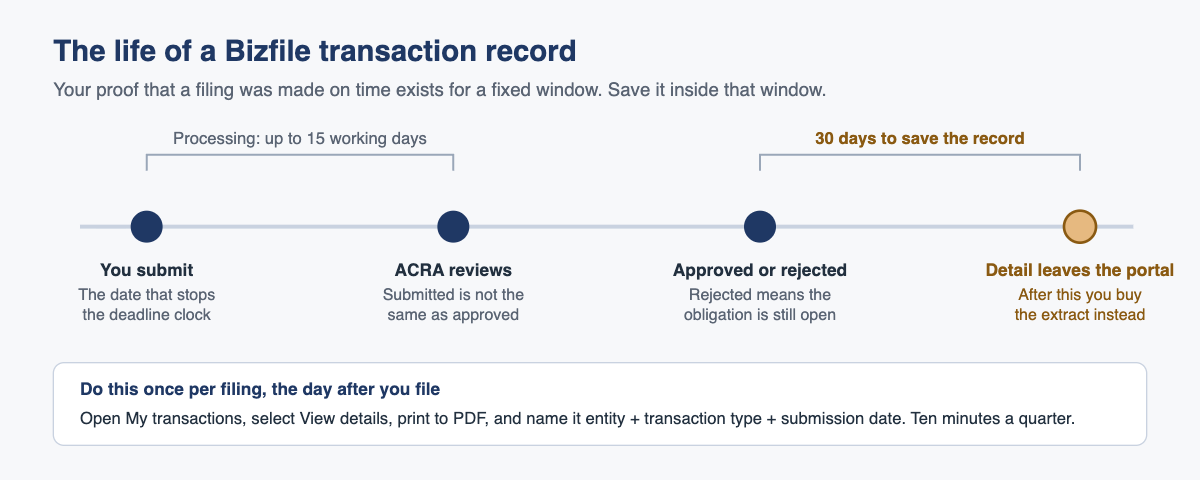
Processing time. Some applications take up to 15 working days to process. If ACRA needs longer to review something, it will tell you. This matters because “submitted” and “approved” are different events on different dates, and the date that usually determines whether you were on time is the date of submission, not the date of approval.
Retention. Transaction details remain viewable for 30 days after the transaction is approved or rejected. After that the detail is no longer sitting in the portal, and the route to a historical record is to purchase the relevant extract from ACRA’s information products.
Thirty days is the number to internalise. It is shorter than a quarterly review cycle, far shorter than an audit cycle, and much shorter than the gap between a filing and the moment somebody disputes it.
How to check a filing actually went through
Do this the day after you file, not the month after.
- Go to Bizfile and select Login.
- Choose Business User to authenticate through Corppass, or Individual User to authenticate through Singpass. Which one you use depends on whether you are filing for an entity or acting personally.
- Complete the Singpass or Corppass authentication. You land on your Bizfile dashboard.
- Open My transactions.
- Find the transaction and select View details to see the full record and any actions still open on it.
- Save it. Print to PDF, name the file properly, and put it where your accountant and your auditor can find it.
Step six is the one everyone skips, and it is the only one that survives past 30 days.
Reading the statuses without guessing
| What you see | What it actually means | What to do |
|---|---|---|
| Nothing at all for a filing you thought you made | The submission never completed, usually because payment did not go through | Refile from the start, and check whether a deadline has now passed |
| Submitted and awaiting processing | ACRA has it. The clock on your deadline stopped at the submission date | Nothing. Save the record and wait |
| Pending action from you | ACRA has raised a clarification or needs an endorsement | Act now. The filing is not complete and time is running |
| Approved | Lodged and reflected in the register | Save the record within 30 days |
| Rejected | Not lodged. The obligation is still outstanding | Fix the reason and resubmit. If the deadline has passed, expect a penalty |
The row that costs companies money is the third one. A transaction sitting in a pending state is not a filing in progress; it is a filing that has stopped. Nobody at ACRA will chase you into it. If the notification about it went to an email address nobody monitors, the transaction can sit there for months while the underlying deadline sails past. We have covered how that happens, and how to stop it, in the ACRA alerts companies miss.
Using the history to prove you filed on time
Late lodgement penalties turn on dates. Companies must notify ACRA of a change of registered office within 14 days under section 143(1) of the Companies Act 1967, and of a director joining or leaving within 14 days under section 173A(1)(b). Annual returns are filed under section 197. Miss a window and the penalty is mechanical: for a company, S$50 where the default is within three months and S$200 beyond that, charged per late filing.
So the question in any dispute is narrow. Was the submission made inside the window?
Your transaction record answers it, and it is worth more than anything you can reconstruct afterwards because it is contemporaneous, it is ACRA’s own system, and it is dated. An email from your corporate secretary saying “we filed it on the 14th” is a recollection. The transaction record is evidence.
Three occasions when you will want it:
When ACRA charges a penalty you think is wrong. Directors can appeal a late lodgement penalty using ACRA’s Late Lodgment Appeal Form, with supporting documents attached. Reviews take around four weeks. An appeal supported by the transaction record showing a timely submission is a very different document from an appeal that asks ACRA to take your word for it.
When your auditor tests statutory compliance. Filing dates for officer changes, share allotments and the annual return are standard audit enquiries. Producing the transaction records takes minutes if you saved them and is impossible if you did not.
When someone is buying your company or lending to it. Due diligence questionnaires ask whether the company has filed everything on time and whether any penalties have been paid. “We believe so” is a finding. A folder of dated records is not. The other side will be running the checks described in our guide to using Bizfile’s search functions for due diligence, so you may as well know what they will find.
Where the submission date is not the whole answer
Be careful with one category. A private company’s share transfer or allotment takes legal effect when ACRA’s electronic register of members is updated on filing, not when the parties signed. Backdating a transfer date or an allotment date in the filing is generally not permitted. So for share transactions your transaction record proves when you filed, and the filing is also the moment the thing happened. If a share sale was agreed in March and lodged in September, the register says September, and no amount of paperwork in your own files changes that.
That distinction has real consequences for shareholder disputes, for stamp duty timing and for anyone relying on a shareholding as at a particular date. Our note on stamp duty on share transfers covers the tax side of the same timing problem, and the Companies Act 1967 deep-dive FAQ covers the company law side.
Retrieving past submissions after the window closes
Once the 30 days are up, the transaction detail is no longer available to view in the portal, and the route to a record is to purchase the relevant extract from ACRA. That is a real cost and a real delay, and it is entirely avoidable.
What we would suggest instead, and what we do for the companies we act for:
- A single folder per entity, per financial year, holding a saved PDF of every Bizfile transaction record and every payment confirmation.
- Filenames that a stranger can sort: entity, transaction type, submission date.
- A note in the folder of the submission date and the statutory deadline side by side, so the compliance position is visible without anyone having to work it out.
- The same folder cross-referenced against your accounting records, so an ACRA card charge in the bank feed always has a matching transaction record behind it. Our piece on making payments on Bizfile covers the payment side of that reconciliation.
Downloading your statutory registers periodically is the complementary check: the transaction record proves you filed, and the register proves the filing landed. Both are free, and our guide to downloading your company registers from Bizfile covers that side.
What goes wrong in practice
The filing that never was. Somebody completed the form, the payment failed at the last step, and nobody checked. There is no transaction, no filing and no notification, because from ACRA’s perspective nothing happened. Discovered months later, usually by a penalty.
Submitted is mistaken for approved. A transaction awaiting processing is not yet reflected in the register. If you are about to sign something that depends on the updated position, look at the register, not at your own submission.
A pending clarification nobody sees. ACRA raises a query, it sits under pending actions, and the person who filed has left the company or changed roles. The deadline passes while the transaction is technically open.
Handover without records. A company changes corporate secretary. The outgoing provider’s Bizfile login goes with them, and so does visibility of anything filed under it. If the transaction records were never saved to the company’s own files, the history effectively leaves the building. This is one of the strongest arguments for keeping your own copy of every record regardless of who does the filing.
The 30 days ran out. The most common and least dramatic failure. Nothing went wrong with the filing at all. The company just cannot prove it cheaply any more.
Frequently asked questions
How do I check whether my ACRA filing went through?
Log in to Bizfile, open My transactions, and find the submission. If it is not listed, it was never completed, usually because the payment failed. Select View details on the transaction to see its status and anything still outstanding on it.
How long does ACRA take to process a Bizfile transaction?
Some applications take up to 15 working days. If ACRA needs more time to review your application, it will notify you. Many straightforward filings are far quicker, but plan around the longer figure when a deadline is involved.
How long can I view a past Bizfile transaction?
Transaction details are available for 30 days after the transaction is approved or rejected. After that you would need to purchase the relevant extract from ACRA. Save a PDF of the record while it is still on screen.
Can I use my Bizfile transaction record to appeal a late lodgement penalty?
Yes. Directors can appeal using ACRA’s Late Lodgment Appeal Form with supporting documents attached, and reviews take about four weeks. A dated transaction record showing a timely submission is the strongest support you can attach.
Does the submission date or the approval date count for the deadline?
The date you submit is what stops the clock on a filing deadline. Approval can follow days later. That is precisely why the transaction record, which carries the submission date, is worth keeping.
My corporate secretary files for us. Can I see the transactions?
You will see what was filed under your own login. Filings made under a provider’s login sit in their transaction list, which is why a company should ask for a saved copy of every transaction record as a matter of routine rather than relying on continued access.
The cheapest compliance file you will ever keep
A folder of dated PDFs is not a governance system. It is ten minutes a quarter. But it is the difference between answering a due diligence question in an afternoon and spending a week buying extracts to reconstruct what you already did correctly the first time.
Raffles Corporate Services files for several hundred Singapore companies, and we keep the transaction record for every one of those filings against the entity, dated against its statutory deadline, so it is there when an auditor, a bank or ACRA asks. If your own filing history currently lives in somebody’s browser session, that is worth fixing before you need it.
You can reach us through Raffles Corporate Services, or read more on Singapore corporate secretarial practice at Singapore Secretary Services.
The Editorial Team, Raffles Corporate Services
Need help with accounting or bookkeeping?
If you would like accounting, bookkeeping or financial reporting support for your business, email [email protected] or WhatsApp +65 8501 7133.
Our accounting and tax advisers can assist. Where legal advice is needed, advisers from our associated law firms can also assist.