

Nearly every Bizfile error when you update a director, shareholder or member comes down to one of four causes: you are logged in the wrong way, you are on the wrong transaction for that person, a field has silently rejected a character you typed, or your email address has never been verified.
Raffles Corporate Services works with a panel of experienced Singapore law firms who offer cost-effective and efficient legal service and advice. This article is general information only and is not legal advice.
None of those are entitlement problems. You are almost certainly allowed to make the filing. Bizfile is just refusing to tell you which of the four is in the way.
Sorting it out the same day matters. A change of officers must reach ACRA within 14 days, and a late lodgement penalty of $50 applies for a default within three months, rising to $200 beyond that, charged per late filing. Two directors filed six months late is $400, not $200.
Diagnose it in one table
Find your symptom, read across.
| What you are seeing | What is actually wrong | The fix |
|---|---|---|
| “Sorry, you are not authorised to view this page” after selecting the entity | You are in a Singpass session, or in the wrong profile, or that entity type cannot file that transaction | Log in as a business user via Corppass, then confirm the profile: CSPs must be in the CSP profile, not My Entities |
| The shareholder list is short, and the person you want is not on it | The Update Shareholder Information page hides corporate shareholders and individuals who also hold office in the company | Use Update Position Holder for officer-shareholders, Update Entity Information for corporate shareholders |
| “All shareholders currently hold a position in the entity” | Every shareholder is also an officer, so the shareholder transaction has nothing to show you | File through Update Position Holder instead |
| The Unit field rejects what you type | The field takes letters and digits only, up to five characters | Enter 05-01 rather than 05-01/10, and no symbols |
| “FBRN cannot have special characters” | The Foreign Business Registration Number field is alphanumeric only | Enter B123456, not B-1-23456 |
| The FBRN is wrong and the field is greyed out | FBRN is locked after submission | Wrong number keyed: file a Notice of Error. Genuine change abroad: file a general lodgement |
| A citizen’s or PR’s nationality, ID type, address or date of birth is wrong | Bizfile takes those fields from other government records on a periodic refresh | Do nothing in Bizfile. Correct it at source and wait for the next refresh |
| You cannot find the link to endorse your own appointment or withdrawal | You are looking in a Corppass session. Endorsements are personal | Log in with Singpass and open Pending Actions on your own dashboard |
| The email verification link says expired or invalid | The link is short-lived and single use | Log in with Singpass, request a resend from Pending Actions, and verify inside 24 hours |
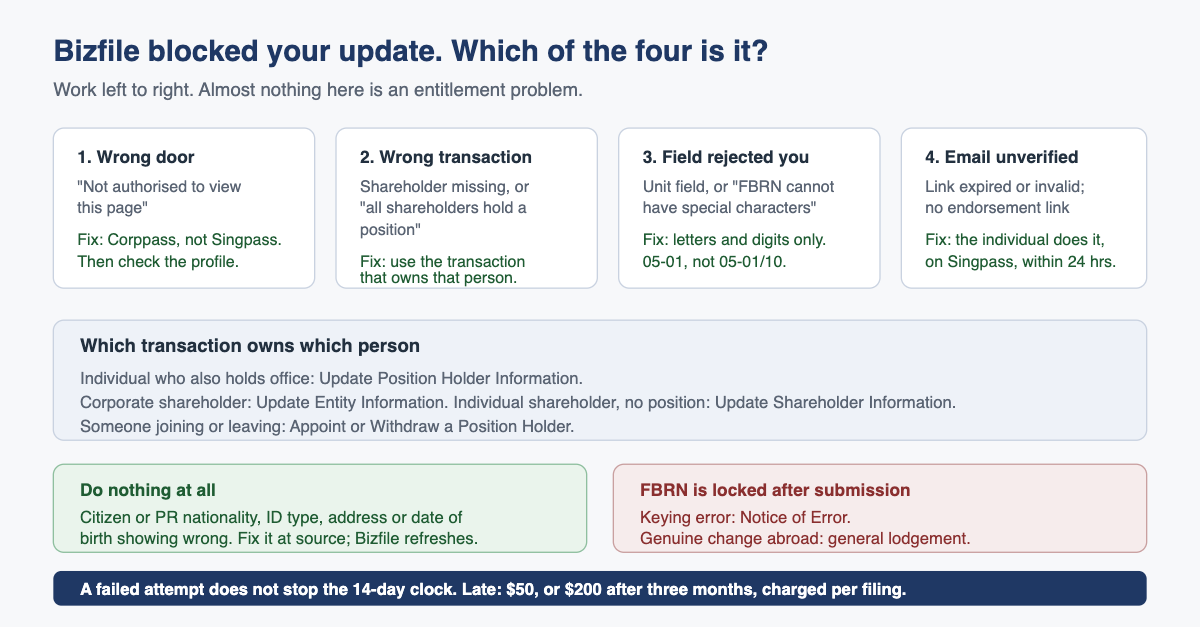
Why “not authorised” almost never means not authorised
Bizfile decides what you may do from two things: the credential you signed in with, and the profile you are sitting in once you are inside.
Filings that change an entity’s record are business transactions, and they need Corppass. If you signed in with Singpass because that is what you had open, you will reach the dashboard, see the company, and be stopped at the door of the transaction. Our guide to logging in as a business user covers the Corppass route, and the individual login guide covers what Singpass is actually for.
The second trap catches people who wear more than one hat. If you are an officer of four companies and also work for a corporate service provider, Bizfile keeps those identities in separate profiles, and filing for a client from your own entity profile will not work. A third possibility is not a bug at all: some entity types cannot file some transactions, so a share transaction will never open for a sole proprietorship.
The order to work through it
- Sign out completely. Do not switch tabs and hope.
- Sign back in and choose the business user route, which sends you through Corppass.
- Check the profile selector before you touch anything. Corporate service providers select the firm profile, then the client.
- Confirm the entity name in the top bar is the one you mean to file for, then open the transaction from the menu rather than from a bookmarked link.
Why half your shareholders are missing from the shareholder page
This one causes more wasted time than any other, because nothing appears broken. The page loads, it lists shareholders, and the person you want is not among them.
The Update Shareholder Information transaction is narrower than its name suggests. It does not show corporate shareholders, and it does not show individuals who also hold a position in the same company. In a typical Singapore private company where the two founders are both directors and both shareholders, that can mean the page shows nobody at all, which is why some users see the message telling them that all shareholders hold positions.
The logic is that a person’s particulars live in one place per company. If someone is a director, their name, identification and addresses are maintained through the position holder record, and changing them twice would create two versions of the truth. So the routing is:
- Individual who is also an officer: Update Position Holder Information.
- Corporate shareholder: Update Entity Information.
- Individual shareholder with no position in the company: Update Shareholder Information.
- Someone joining or leaving as an officer: Appoint or Withdraw a Position Holder, which is a different transaction again.
If you want every shareholder in one list, do not use the update transaction for that. Open the entity details and look at the share capital and shareholders view, or pull the free register of members. Our guide to Bizfile’s search functions covers the products that give you the complete picture.
The fields that quietly reject you
Two fields cause most of the validation failures, and both are unhelpfully silent about why.
The Unit field accepts letters and digits only, to a maximum of five characters. Real Singapore addresses break that rule constantly. A unit written as 05-01/10 will not go in whole; enter the first unit only.
The Foreign Business Registration Number field is alphanumeric only, so hyphens, slashes and commas are all rejected. A registration number printed abroad as B-1-23456 goes in as B123456.
The FBRN carries a sting the Unit field does not. Once submitted, it locks, and you have two routes depending on what went wrong:
- You made a keying error. File a Notice of Error to correct the record.
- The number genuinely changed in the country of origin. That is not an error, it is an update, and it goes through a general lodgement.
Choosing the wrong one of those two wastes a fortnight, because the filing will be rejected and you will start again.
The data you must not try to fix
If a Singapore citizen’s or permanent resident’s identification type, nationality, residential address or date of birth is showing incorrectly, the instinct is to open an update transaction and correct it. Resist it.
Those particulars are not keyed into Bizfile by you. They are drawn from other government records on a periodic refresh, so overwriting them locally would put ACRA’s record out of step with the source, and the next refresh would overwrite you anyway.
Fix the underlying record with the agency that owns it, then wait. The corrected details will flow through and appear in information products such as the Business Profile after the next update cycle. This is one of the few places in Singapore corporate compliance where doing nothing is the right answer, which is precisely why it surprises people. The same logic applies to a director’s own particulars, as we set out in our guide to changing an officer’s particulars.
When the blocker is an email address nobody verified
Several of these transactions will not complete until the email address attached to the individual has been verified, and the verification is a personal act. It runs through Singpass, on the individual’s own dashboard, not through the company’s Corppass session. That is why a company secretary can be fully authorised, in the right profile, on the right transaction, and still stuck: the blocker sits with a person who has never logged in to Bizfile at all.
The verification link is also time-limited and single use. If it has expired:
- The affected individual logs in to Bizfile with Singpass.
- They open Pending Actions on their dashboard.
- They request a fresh link.
- They complete the verification within 24 hours of the request.
The same dashboard is where a newly appointed or withdrawing officer finds the endorsement link. Endorsement is not something the company can do on the person’s behalf, and it will never appear in a Corppass session, which is why people hunt for it in the wrong place. The first fifteen minutes in Bizfile walks through what a personal dashboard contains.
What goes wrong: troubleshooting becomes drift
The failure mode we see is not the error. It is what happens next.
Someone tries twice on a Friday, cannot get the transaction to open, decides to deal with it next week, and then forgets. The 14-day window closes. Three months later the annual review surfaces a director who left in March and is still on the register, an investor who was issued shares that were never lodged, and an email address nobody ever verified.
By then you are paying $200 per late filing rather than $50, and you are explaining the gap to a bank or an auditor. Worse, an allotment or transfer of shares in a private company does not take legal effect until the Registrar updates the electronic register of members, so a filing that never happened is not a paperwork failure. It means the shares did not move.
The cheap control is a rule: if a Bizfile transaction fails twice, stop guessing and escalate the same day. Set your ACRA alerts so the reminders reach a monitored inbox rather than a founder’s personal address, and the drift mostly stops on its own.
Frequently asked questions
Why does Bizfile say I am not authorised when I am a director of the company?
Because being a director does not itself give you Bizfile filing rights. Entity filings run through Corppass, and someone with Corppass administration rights must assign you the relevant e-service. If you logged in with Singpass instead, you will see the entity but be blocked at the transaction.
Why can I not see corporate shareholders on the update shareholder page?
That transaction only handles individual shareholders who hold no position in the company. Corporate shareholders are maintained through the Update Entity Information transaction, and individuals who are also officers are maintained through Update Position Holder Information. The page is not broken, it is routing you elsewhere.
My director’s nationality is showing incorrectly in Bizfile. Should I update it?
No. For Singapore citizens and permanent residents, those particulars come from other government records on a periodic refresh. Correct the record with the agency that holds it. Bizfile will pick up the change on the next refresh and it will then appear in information products such as the Business Profile.
Who has to verify the email address, the company or the individual?
The individual, using Singpass on their own dashboard. The company cannot do it for them, and it cannot be done inside a Corppass session. The verification link expires, so if it has lapsed the person requests a new one from Pending Actions and completes it within 24 hours.
Does a failed filing attempt stop the 14-day clock?
No. The deadline runs from the date of the change, not from the date you first tried to file. Attempts that failed do not count. If the filing lands late, the penalty applies per late transaction, so several changes left to drift together become expensive quickly.
The part worth outsourcing
Most of these errors take a professional two minutes and a first-timer two afternoons, because the knowledge is entirely about which transaction owns which person, and there is nowhere obvious to learn that.
Raffles Corporate Services files officer and shareholder changes for several hundred Singapore companies, holds the corporate service provider profile that avoids most of the access errors above, and works inside the 14-day window as routine rather than as rescue. If you have a filing stuck in Bizfile right now, or a change you know is already late, that is usually a short conversation and a same-day fix.
For the wider context, our overview of what Bizfile actually is explains which transactions exist and who may file them, and the Companies Act 1967 deep-dive FAQ covers the obligations behind the filings.
You can reach us through Raffles Corporate Services, or read more on Singapore corporate secretarial practice at Singapore Secretary Services.
— The Editorial Team, Raffles Corporate Services
Need help with corporate secretarial or compliance matters?
If you would like help with your company's corporate secretarial, governance or compliance requirements, email [email protected] or WhatsApp +65 8501 7133.
Our team can assist with corporate secretarial, accounting and tax matters. Where legal advice is needed, advisers from our associated law firms can assist.