

Nearly everything a Singapore company has to tell ACRA is done in one portal, Bizfile, and the reason people get lost in it is not complexity. It is that the portal is organised around ACRA’s functions rather than around your task. This article is the translation layer: your job on the left, where it lives on the right.
Raffles Corporate Services works with a panel of experienced Singapore law firms who offer cost-effective and efficient legal service and advice. This article is general information only and is not legal advice.
If what you actually want is an explanation of what Bizfile is and what it can and cannot do, start with our companion piece on what Bizfile actually is. This one assumes you know that much and answers the next question, which is where to go.
The current portal launched on 9 December 2024, replacing its predecessor. If your mental model of the system dates from before then, or from a colleague’s instructions written before then, that is worth knowing: the menu structure moved, and a good deal of advice still circulating refers to a layout that no longer exists.
First question: who are you logging in as?
This is the fork that causes the most wasted time, and it is not intuitive, because the same human being can be both.
You log in as an individual user with Singpass when you are acting as yourself: checking what entities and positions are recorded against your own identity, verifying your email address, buying information as a member of the public, or registering a sole proprietorship in your own name.
You log in as a business user with Corppass when you are acting for an entity: filing an annual return, appointing an officer, updating an address, lodging a resolution. Corppass rights are granted per entity and per e-service, which is why a director of three companies can be able to file for one of them and not the other two.
Most “the system won’t let me do this” problems are one of these three things, in this order of frequency: you are logged in under the wrong user type, you are in the right user type but the wrong entity profile, or your Corppass role was never assigned for that particular e-service.
| Symptom | Almost always means |
|---|---|
| The transaction is not in your menu at all | Wrong login type, or the Corppass e-service role was never assigned |
| The menu is right but the company details look unfamiliar | You are in the wrong entity profile: switch profile |
| “Transaction cannot proceed” | Your email address has not been verified yet |
| You can see the filing but cannot submit it | You hold a preparer or read-only role, not an approver role |
Our guides go through each route properly: logging in as a business user via Corppass, logging in as an individual with Singpass, and, for a brand new company that has no access to anything yet, setting up Corppass from UEN to first Bizfile login.
The four zones of the portal
Functionally, Bizfile does four things. Almost every task you will ever have falls into one of them.
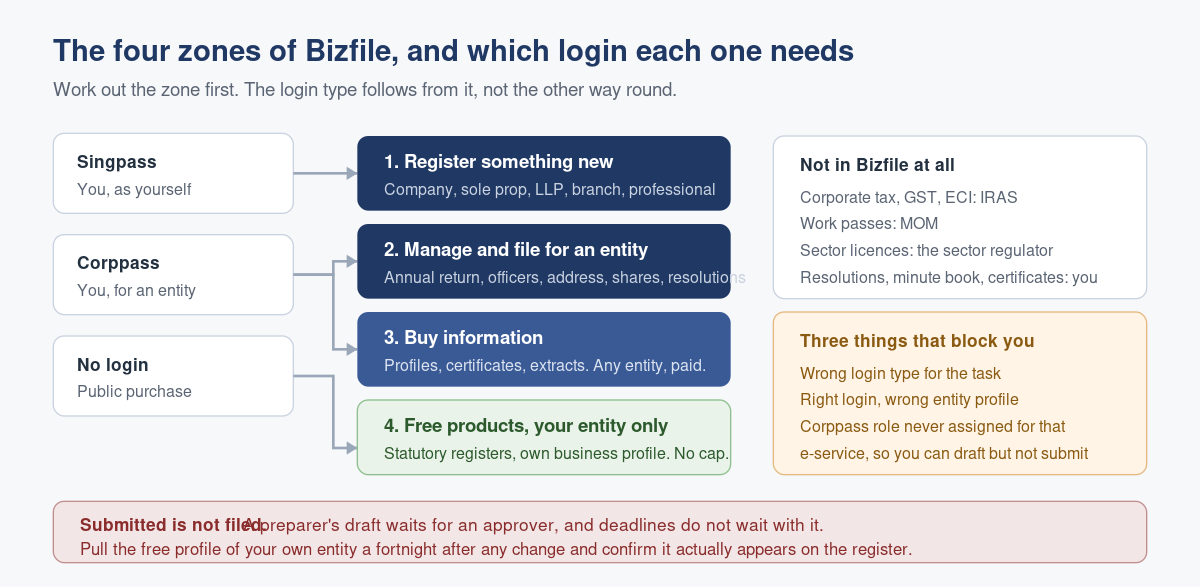
Zone 1: Registering something new
Incorporating a company, registering a sole proprietorship or partnership, registering an LLP, registering a foreign company’s branch, and registering professionals such as public accountants and filing agents. This is the only zone you can enter without already having an entity, which is why it is also the only zone where a first-time user is working entirely as an individual.
Zone 2: Managing and filing for an existing entity
The zone where a company secretary spends their working life. Annual returns for companies and annual declarations for LLPs, changes of officers, changes of registered office, share allotments and transfers, controller register updates, alterations of constitution, notices of resolution, striking off applications and endorsements.
Two things are worth knowing before you enter it. Most of these filings carry a statutory deadline, and a good number run to 14 days from the event rather than from when you noticed. And late filing is charged, on a tiered scale that gets steeper the longer you leave it: see ACRA late lodgement penalties for how the tiers work, and what your entity type actually has to file for the full obligation list by structure.
Zone 3: Buying information
Business profiles, people profiles, certificates, extracts and the rest of ACRA’s paid information products. This is the zone the general public uses, and it needs no relationship with the entity at all: anyone can buy a profile on any registered Singapore entity.
Start with the overview of buying ACRA business information if you are not sure which product answers your question, then the types of information product and what each costs. If you already know you want a specific document, we have step guides for buying a Business Profile.
Zone 4: Free products for your own entity
The zone almost nobody uses, and the one worth knowing about. If you are an active officer or member of an entity, a set of items about that entity is available to you at no charge, including your statutory registers and a business profile of your own company. There is no cap and no charge, so the only cost is the two minutes. See downloading free Business Profiles.
The routing table
| What you want to do | Zone | Log in as | Read this |
|---|---|---|---|
| Get access for a brand new company | Setup | Individual, then business | Corppass setup for a new company |
| Decide who in the firm should be able to file | Setup | Business (admin) | Who should have Bizfile access |
| Find your way round on day one | Any | Either | Your first fifteen minutes in Bizfile |
| Check what is registered against your own name | 4 | Individual (Singpass) | Logging in as an individual |
| File the annual return | 2 | Business (Corppass) | Compliance requirements by entity type |
| Change the financial year end | 2 | Business (Corppass) | Changing your financial year end |
| Endorse a striking off application | 2 | Business (Corppass) | Endorsing a striking off application |
| Take filing rights away from a former provider | 2 | Business (admin) | Removing filing access for a CSP |
| Check out a counterparty before you sign | 3 | Either | Buying a Business Profile |
| Work out what a filing or product will cost | 3 | Either | ACRA service and transaction fees |
| Report a suspected breach by another entity | Complaints | Either | Filing a complaint with ACRA |
What Bizfile is not
Being clear about the boundary saves a lot of searching in the wrong place.
Bizfile is not your tax portal. Corporate income tax, GST and the estimated chargeable income filing all live with IRAS at iras.gov.sg, on their own deadlines. Changing your financial year end with ACRA does not change your basis period with IRAS, and the two have to be handled together.
It is not your work pass system either, nor your licensing counter. Employment passes sit with MOM, and sector licences, from food to childcare to financial services, are issued by the relevant agency. Registration with ACRA is only the entry ticket.
And Bizfile is not your minute book. The portal holds what has been lodged. It does not hold your board resolutions, your share certificates, your directors’ service contracts or the working papers behind a transaction. Companies that treat “it is in Bizfile” as a complete corporate record discover the gap during a due diligence exercise, which is the worst possible moment.
Where it goes wrong: assuming submitted means filed
The failure mode that costs real money has nothing to do with navigation. It is the gap between a transaction being started and a transaction being lodged.
A filing prepared by a staff member with a preparer role sits waiting for an approver. Nobody tells the approver, or the approver is on leave, or the approver has left the company and nobody noticed the role was still theirs. The deadline passes. Everyone involved believes the filing went in, because they remember doing it.
Certain filings then need a second party to act at all, which widens the gap further. A striking off application, for instance, requires endorsement by the officers and members, and each of them has their own clock to act within. One unresponsive shareholder stalls the whole thing.
The fix is boringly simple and almost never done: after any filing, go back in and look. Pull the free business profile of your own entity and check the change actually appears. Do it a fortnight after the event, not a year later at audit. Free, unlimited, and it converts a compliance risk into a two minute habit.
Frequently asked questions
Do I need Singpass or Corppass for Bizfile?
Both, for different jobs. Singpass logs you in as an individual, for things you do as yourself: checking what is registered against your identity, verifying your email, buying information, registering a business in your own name. Corppass logs you in as a business user to transact for an entity, and those rights are granted per entity and per e-service.
Why can I see a transaction but not submit it?
You most likely hold a preparer or read-only role rather than an approver role for that e-service. Corppass permissions are granular, so a person can be able to draft a filing and unable to lodge it. Your company’s Corppass administrator can change the assignment. This is also the most common reason a filing quietly misses its deadline.
Can I look up any Singapore company on Bizfile?
Yes. Information products such as business profiles are available on any registered Singapore entity, to anyone, without any relationship to that entity. They are paid products. The free items are different: those are limited to your own entity and available only if you are a current officer or member of it.
Does filing with ACRA mean I have dealt with IRAS?
No. ACRA and IRAS are separate, with separate portals and separate deadlines. Your annual return to ACRA does not satisfy your corporate tax filing, and a financial year end change filed with ACRA does not by itself resolve the basis period position with IRAS. Both need handling, usually together.
How do I know my filing actually went through?
Check the register rather than your memory. Download the free business profile of your own entity and confirm the change appears. It costs nothing, there is no limit on how often you can do it, and a fortnight after the event is the right moment to look, while any problem is still easy to fix.
The portal looks different from the instructions I was given. Why?
The current Bizfile portal launched on 9 December 2024 with a redesigned structure. Guidance written before that date, including internal notes and colleagues’ instructions, may refer to menus that no longer exist. Work from the current layout, and use the portal’s own chatbot for quick general queries.
Or you could not think about it at all
There is a version of company administration where somebody else holds the Corppass roles, watches the deadlines, lodges the filings and checks the register afterwards to confirm they landed. Most directors discover they wanted that version about a week after a penalty notice arrives.
Raffles Corporate Services does exactly this for several hundred Singapore companies: filings lodged inside their windows, registers reconciled against ACRA’s records before each year end, and access controlled so that the people who need it have it and nobody else does. If you are not certain who currently holds filing rights over your company, start there.
You can reach us through Raffles Corporate Services, or read more on Singapore corporate secretarial practice at Singapore Secretary Services.
— The Editorial Team, Raffles Corporate Services
Need help with corporate secretarial or compliance matters?
If you would like help with your company's corporate secretarial, governance or compliance requirements, email [email protected] or WhatsApp +65 8501 7133.
Our team can assist with corporate secretarial, accounting and tax matters. Where legal advice is needed, advisers from our associated law firms can assist.